画像検出に向けて利用するフレームワーク
本家のDarknetも利用しましたが、特定ケースでの学習失敗やメモリ操作関係の不具合など、私自身も上手く行かないケースも有り、ブログ記事などからもAlexeyABを勧めている内容が多かったので、早い時期よりAlexeyABを導入し利用しております。
AlexeyABのDarknetは、WindowsおよびLinuxのDarknet Yolo v3 & v2のNeural Networks for object detection (Tensor Cores are used)をサポートしております。
AlexeyAB公開サイト
以下、サイトにすべての利用方法が記載されております。関連ソフトのインストール方法や、独自学習の方法など。
Darknetインストール方法
本件も同様ですが、AlexeyABでも2つのインストール方法が紹介されております。
最終的には、Legacy wayのVisual StudioでコンパイルしたDarknetを利用しております。この投稿では、1番めのVCPKGを利用したコンパイル方法を紹介します。
- How to compile on Windows (using vcpkg)
- How to compile on Windows (legacy way)
GitHUBよりAlexeyAB一式をダウンロードしておきます。
今後の学習モデル作成時などにも利用するフォルダとなるので、それなりの容量の余裕などを考え、各種ファイルを配置して下さい。
VCPKGを利用したDarknetの導入
Visual Studioインストール
Visual Studio CommunityよりVisual Studioをダウンロードしインストールします。
CUDAとcuDNNインストール
NVIDIA cuDNNの入手には、開発コミュニティへの登録が必要であるが、 cuDNNは、機械学習時のGPU-accelerated libraryとなるので、開発者登録を行い、導入しているCUDAと同じバージョンのcuDNNを入手し、入手したファイルをCUDAインストールフォルダに配置しましょう。
gitとcmakeのインストール
Gitおよびcmakeを導入して下さい。
CMakeよりWindows win64-x64 Installerをダウンロードし、インストラーを用いてCMakeをインストールします。
vcpkインストール
Microsoft vcpkへアクセスし、インストールを
- Githubからcloneする。
- クローンディレクトリの"bootstrap-vcpkg.bat"を実行する。
※ ここで、Visual Studioをインストール → "vcpkg.exe"が生成される。 - (visual studioに統合する場合)そこのフォルダで管理者権限で cmd を実行して以下のコマンドを入力。
cmd .\vcpkg.exe integrate install
環境変数「VCPKG_ROOT」「VCPKG_DEFAULT_TRIPLET」を設定
VCPKG_ROOTの環境変数にvcpkgのインストールパスを設定VCPKG_DEFAULT_TRIPLETの環境変数にx64-windowsを設定
VCPKGで前提ソフトインストール
> cd $env:VCPKG_ROOT
\Git\vcpkg> .\vcpkg.exe install pthreads opencv[cuda,ffmpeg]
The following packages will be built and installed:
* cuda[core]:x64-windows
* eigen3[core]:x64-windows
* libjpeg-turbo[core]:x64-windows
* liblzma[core]:x64-windows
* libpng[core]:x64-windows
opencv[core,cuda,eigen,ffmpeg,flann,jpeg,opengl,png,tiff]:x64-windows
pthreads[core]:x64-windows
* tiff[core]:x64-windows
* zlib[core]:x64-windows
Additional packages (*) will be modified to complete this operation.
Starting package 1/9: zlib:x64-windows
Building package zlib[core]:x64-windows...
Warning: The following VS instances are excluded because the English language pack is unavailable.
D:\Program Files (x86)\Microsoft Visual Studio\2019\Community
D:\Program Files (x86)\Microsoft Visual Studio\2019\Community
Please install the English language pack.
-- Downloading http://www.zlib.net/zlib-1.2.11.tar.gz...
-- Extracting source S:/Public/Documents/Git/vcpkg/downloads/zlib1211.tar.gz
-- Applying patch cmake_dont_build_more_than_needed.patch
-- Using source at S:/Public/Documents/Git/vcpkg/buildtrees/zlib/src/1.2.11-f690224aeb
-- Downloading https://github.com/ninja-build/ninja/releases/download/v1.8.2/ninja-win.zip...
-- Configuring x64-windows
CMake Error at scripts/cmake/vcpkg_execute_required_process.cmake:58 (message):
Command failed: ninja -v
Working Directory: S:/Public/Documents/Git/vcpkg/buildtrees/zlib/x64-windows-rel/vcpkg-parallel-configure
Error code: 1
See logs for more information:
S:\Public\Documents\Git\vcpkg\buildtrees\zlib\config-x64-windows-out.log

Call Stack (most recent call first):
scripts/cmake/vcpkg_configure_cmake.cmake:290 (vcpkg_execute_required_process)
ports/zlib/portfile.cmake:22 (vcpkg_configure_cmake)
scripts/ports.cmake:74 (include)

Error: Building package zlib:x64-windows failed with: BUILD_FAILED
Please ensure you're using the latest portfiles with `.\vcpkg update`, then
submit an issue at https://github.com/Microsoft/vcpkg/issues including:
Package: zlib:x64-windows
Vcpkg version: 2019.07.18-nohash

Additionally, attach any relevant sections from the log files above.
英語の言語パッケージがないと、エラーがでるので英語の言語パッケージをインストールします。
参考URL:https://github.com/Microsoft/vcpkg/issues/1939#issuecomment-354644869
PowershellよりDarknetビルド実行
Powershellのコマンドプロンプトを開き、Darknetをダウンロードしたフォルダで、「./build.ps1」を実行しビルドを実施します。
PS S:\Public\Documents\Git\darknet> .\build.ps1
Found vcpkg in VCPKG_ROOT: S:\Public\Documents\Git\vcpkg\
Found VS in D:\Program Files (x86)\Microsoft Visual Studio\2019\Community
Visual Studio Command Prompt variables set
Setting up environment to use CMake generator: Visual Studio 16 2019
Added missing env variable CUDA_TOOLKIT_ROOT_DIR

ディレクトリ: S:\Public\Documents\Git\darknet

Mode LastWriteTime Length Name
---- ------------- ------ ----
d----- 2019/07/25 11:23 build_win_release
-- Selecting Windows SDK version 10.0.17763.0 to target Windows 10.0.18362.
-- The C compiler identification is MSVC 19.21.27702.2
-- The CXX compiler identification is MSVC 19.21.27702.2
-- Check for working C compiler: D:/Program Files (x86)/Microsoft Visual Studio/2019/Community/VC/Tools/MSVC/14.21.27702/bin/Hostx64/x64/cl.exe
-- Check for working C compiler: D:/Program Files (x86)/Microsoft Visual Studio/2019/Community/VC/Tools/MSVC/14.21.27702/bin/Hostx64/x64/cl.exe -- works
-- Detecting C compiler ABI info
-- Detecting C compiler ABI info - done
-- Detecting C compile features
-- Detecting C compile features - done
-- Check for working CXX compiler: D:/Program Files (x86)/Microsoft Visual Studio/2019/Community/VC/Tools/MSVC/14.21.27702/bin/Hostx64/x64/cl.exe
-- Check for working CXX compiler: D:/Program Files (x86)/Microsoft Visual Studio/2019/Community/VC/Tools/MSVC/14.21.27702/bin/Hostx64/x64/cl.exe -- works
-- Detecting CXX compiler ABI info
-- Detecting CXX compiler ABI info - done
-- Detecting CXX compile features
-- Detecting CXX compile features - done
-- Looking for a CUDA compiler
-- Looking for a CUDA compiler - NOTFOUND
-- Looking for pthread.h
-- Looking for pthread.h - not found
-- Found Threads: TRUE
-- Found PThreads4W: optimized;S:/Public/Documents/Git/vcpkg/installed/x64-windows/lib/pthreadVC3.lib;debug;S:/Public/Documents/Git/vcpkg/installed/x64-windows/debug/lib/pthreadVC3d.lib
-- Found OpenCV: S:/Public/Documents/Git/vcpkg/installed/x64-windows (found version "3.4.3")
-- Found Stb: S:/Public/Documents/Git/darknet/3rdparty/stb/include
-- Found OpenMP_C: -openmp (found version "2.0")
-- Found OpenMP_CXX: -openmp (found version "2.0")
-- Found OpenMP: TRUE (found version "2.0")
-- ZED SDK not enabled, since it requires CUDA
-- Configuring done
-- Generating done
-- Build files have been written to: S:/Public/Documents/Git/darknet/build_win_release
.NET Framework 向け Microsoft (R) Build Engine バージョン 16.1.76+g14b0a930a7
Copyright (C) Microsoft Corporation.All rights reserved.

Checking Build System
Building Custom Rule S:/Public/Documents/Git/darknet/CMakeLists.txt
yolo_v2_class.cpp
http_stream.cpp
S:\Public\Documents\Git\darknet\src\http_stream.cpp(494,35): warning C4200: 非標準の拡張機能が使用されています: 構造体 または共用体中にサイズが 0 の配列があ
ります。 [S:\Public\Documents\Git\darknet\build_win_release\dark.vcxproj]
image_opencv.cpp
S:\Public\Documents\Git\darknet\src\http_stream.cpp(494,35): message : このメンバーは、既定のコンストラクターまたはコピー/移動代入演算子により無視されます [S:\
Public\Documents\Git\darknet\build_win_release\dark.vcxproj]
S:\Public\Documents\Git\darknet\src\image_opencv.cpp(81,39): warning C4200: 非標準の拡張機能が使用されています: 構造体 または共用体中にサイズが 0 の配列があ
ります。 [S:\Public\Documents\Git\darknet\build_win_release\dark.vcxproj]
S:\Public\Documents\Git\darknet\src\image_opencv.cpp(81,39): message : このメンバーは、既定のコンストラクターまたはコピー/移動代入演算子により無視されます [S:\
Public\Documents\Git\darknet\build_win_release\dark.vcxproj]
S:\Public\Documents\Git\darknet\src\image_opencv.cpp(82,48): warning C4200: 非標準の拡張機能が使用されています: 構造体 または共用体中にサイズが 0 の配列があ
ります。 [S:\Public\Documents\Git\darknet\build_win_release\dark.vcxproj]
S:\Public\Documents\Git\darknet\src\image_opencv.cpp(82,48): message : このメンバーは、既定のコンストラクターまたはコピー/移動代入演算子により無視されます [S:\
Public\Documents\Git\darknet\build_win_release\dark.vcxproj]
S:\Public\Documents\Git\darknet\src\image_opencv.cpp(83,49): warning C4200: 非標準の拡張機能が使用されています: 構造体 または共用体中にサイズが 0 の配列があ
ります。 [S:\Public\Documents\Git\darknet\build_win_release\dark.vcxproj]
コードを生成中...
S:\Public\Documents\Git\darknet\src\image_opencv.cpp(83,49): message : このメンバーは、既定のコンストラクターまたはコピー/移動代入演算子により無視されます [S:\
Public\Documents\Git\darknet\build_win_release\dark.vcxproj]
activation_layer.c
activations.c
art.c
avgpool_layer.c
batchnorm_layer.c
blas.c
box.c
captcha.c
cifar.c
classifier.c
coco.c
col2im.c
compare.c
connected_layer.c
conv_lstm_layer.c
convolutional_layer.c
cost_layer.c
cpu_gemm.c
crnn_layer.c
crop_layer.c
コードを生成中...
コンパイル中...
dark_cuda.c
data.c
deconvolutional_layer.c
demo.c
detection_layer.c
detector.c
dice.c
dropout_layer.c
gemm.c
getopt.c
gettimeofday.c
go.c
gru_layer.c
im2col.c
image.c
layer.c
list.c
local_layer.c
lstm_layer.c
matrix.c
コードを生成中...
コンパイル中...
maxpool_layer.c
network.c
nightmare.c
normalization_layer.c
option_list.c
parser.c
region_layer.c
reorg_layer.c
reorg_old_layer.c
rnn.c
rnn_layer.c
rnn_vid.c
route_layer.c
scale_channels_layer.c
shortcut_layer.c
softmax_layer.c
super.c
swag.c
tag.c
tree.c
コードを生成中...
コンパイル中...
upsample_layer.c
utils.c
voxel.c
writing.c
yolo.c
yolo_layer.c
コードを生成中...
ライブラリ S:/Public/Documents/Git/darknet/build_win_release/Release/dark.lib とオブジェクト S:/Public/Documents/Git/darknet/b
uild_win_release/Release/dark.exp を作成中
dark.vcxproj -> S:\Public\Documents\Git\darknet\build_win_release\Release\dark.dll
Building Custom Rule S:/Public/Documents/Git/darknet/CMakeLists.txt
darknet.c
activation_layer.c
activations.c
art.c
avgpool_layer.c
batchnorm_layer.c
blas.c
box.c
captcha.c
cifar.c
classifier.c
coco.c
col2im.c
compare.c
connected_layer.c
conv_lstm_layer.c
convolutional_layer.c
cost_layer.c
cpu_gemm.c
crnn_layer.c
コードを生成中...
コンパイル中...
crop_layer.c
dark_cuda.c
data.c
deconvolutional_layer.c
demo.c
detection_layer.c
detector.c
dice.c
dropout_layer.c
gemm.c
getopt.c
gettimeofday.c
go.c
gru_layer.c
im2col.c
image.c
layer.c
list.c
local_layer.c
lstm_layer.c
コードを生成中...
コンパイル中...
matrix.c
maxpool_layer.c
network.c
nightmare.c
normalization_layer.c
option_list.c
parser.c
region_layer.c
reorg_layer.c
reorg_old_layer.c
rnn.c
rnn_layer.c
rnn_vid.c
route_layer.c
scale_channels_layer.c
shortcut_layer.c
softmax_layer.c
super.c
swag.c
tag.c
コードを生成中...
コンパイル中...
tree.c
upsample_layer.c
utils.c
voxel.c
writing.c
yolo.c
yolo_layer.c
コードを生成中...
http_stream.cpp
S:\Public\Documents\Git\darknet\src\http_stream.cpp(494,35): warning C4200: 非標準の拡張機能が使用されています: 構造体 または共用体中にサイズが 0 の配列があ
ります。 [S:\Public\Documents\Git\darknet\build_win_release\darknet.vcxproj]
image_opencv.cpp
S:\Public\Documents\Git\darknet\src\http_stream.cpp(494,35): message : このメンバーは、既定のコンストラクターまたはコピー/移動代入演算子により無視されます [S:\
Public\Documents\Git\darknet\build_win_release\darknet.vcxproj]
S:\Public\Documents\Git\darknet\src\image_opencv.cpp(81,39): warning C4200: 非標準の拡張機能が使用されています: 構造体 または共用体中にサイズが 0 の配列があ
ります。 [S:\Public\Documents\Git\darknet\build_win_release\darknet.vcxproj]
S:\Public\Documents\Git\darknet\src\image_opencv.cpp(81,39): message : このメンバーは、既定のコンストラクターまたはコピー/移動代入演算子により無視されます [S:\
Public\Documents\Git\darknet\build_win_release\darknet.vcxproj]
S:\Public\Documents\Git\darknet\src\image_opencv.cpp(82,48): warning C4200: 非標準の拡張機能が使用されています: 構造体 または共用体中にサイズが 0 の配列があ
ります。 [S:\Public\Documents\Git\darknet\build_win_release\darknet.vcxproj]
S:\Public\Documents\Git\darknet\src\image_opencv.cpp(82,48): message : このメンバーは、既定のコンストラクターまたはコピー/移動代入演算子により無視されます [S:\
Public\Documents\Git\darknet\build_win_release\darknet.vcxproj]
S:\Public\Documents\Git\darknet\src\image_opencv.cpp(83,49): warning C4200: 非標準の拡張機能が使用されています: 構造体 または共用体中にサイズが 0 の配列があ
ります。 [S:\Public\Documents\Git\darknet\build_win_release\darknet.vcxproj]
コードを生成中...
S:\Public\Documents\Git\darknet\src\image_opencv.cpp(83,49): message : このメンバーは、既定のコンストラクターまたはコピー/移動代入演算子により無視されます [S:\
Public\Documents\Git\darknet\build_win_release\darknet.vcxproj]
darknet.vcxproj -> S:\Public\Documents\Git\darknet\build_win_release\Release\darknet.exe
Building Custom Rule S:/Public/Documents/Git/darknet/CMakeLists.txt
yolo_console_dll.cpp
uselib.vcxproj -> S:\Public\Documents\Git\darknet\build_win_release\Release\uselib.exe
Building Custom Rule S:/Public/Documents/Git/darknet/CMakeLists.txt
yolo_console_dll.cpp
uselib_track.vcxproj -> S:\Public\Documents\Git\darknet\build_win_release\Release\uselib_track.exe
Building Custom Rule S:/Public/Documents/Git/darknet/CMakeLists.txt
-- Install configuration: "Release"
-- Installing: S:/Public/Documents/Git/darknet/dark.lib
-- Installing: S:/Public/Documents/Git/darknet/dark.dll
-- Installing: S:/Public/Documents/Git/darknet/include/darknet/darknet.h
-- Installing: S:/Public/Documents/Git/darknet/include/darknet/yolo_v2_class.hpp
-- Installing: S:/Public/Documents/Git/darknet/uselib.exe
-- Installing: S:/Public/Documents/Git/darknet/darknet.exe
-- Installing: S:/Public/Documents/Git/darknet/uselib_track.exe
-- Installing: S:/Public/Documents/Git/darknet/share/darknet/DarknetTargets.cmake
-- Installing: S:/Public/Documents/Git/darknet/share/darknet/DarknetTargets-release.cmake
-- Installing: S:/Public/Documents/Git/darknet/share/darknet/DarknetConfig.cmake
-- Installing: S:/Public/Documents/Git/darknet/share/darknet/DarknetConfigVersion.cmake


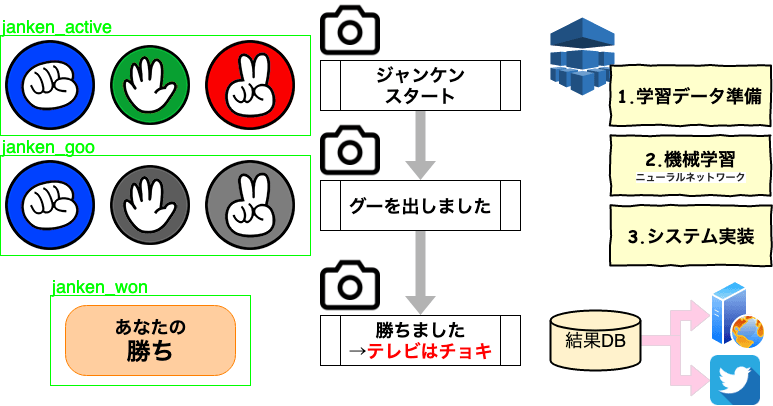

 Choki(チョキ)
  Pa(パー)