コンテンツへスキップ

前提条件

  • (Raspberry Piの)PHPが動作するWEBサーバがセットアップされている
  • (Raspberry Piの)WEBサーバの公開設定が終わっている
    今回は、WEBリクエストの受信は行わないので、必須ではないです。

  • IFTTTサービスの利用登録が実施済みである
  • IFTTTサービスにおいて、Webhooksが利用可能である IFTTT(イフト)でWebhooksの利用
  • IFTTTサービスにおいて、LINE Notifyの利用設定を実施している 参考サイト

全体の流れ

  1. Raspberry PiでLINE送信をIFTTTのWebhooksにトリガー {event}:pushLINE
  2. IFTTTのWebhooksでLINE送信のトリガーを受信
  3. IFTTTのアクションでLINEを送信

トリガー

Raspberry PiよりIFTTTのWebhooksにトリガーを送信

IFTTT(イフト)でWebhooksの利用

PHPのサンプルコードを載せておきます。
アクセスキーなどの初期設定値は、IFTTTより取得して下さい。

//IFTTT用webhookパラメータ
define("IFTTT_POST_API_KEY","/with/key/アクセスキー");
define("IFTTT_POST_API_BASE","https://maker.ifttt.com/trigger/");
//IFTTT用puchLINE
define("IFTTT_LINE_KEY","pushLINE");

function pushLINE($value1, $value2) {
	$url = IFTTT_POST_API_BASE.IFTTT_LINE_KEY.IFTTT_POST_API_KEY;
	$data = array(
		'value1' => $value1,
		'value2' => $value2
	);
	$curl = curl_init();
	curl_setopt($curl, CURLOPT_URL, $url);
	curl_setopt($curl, CURLOPT_POST, TRUE);
	curl_setopt($curl, CURLOPT_POSTFIELDS, http_build_query($data)); // jsonデータを送信
	curl_setopt($curl, CURLOPT_SSL_VERIFYPEER, false);
	curl_setopt($curl, CURLOPT_RETURNTRANSFER, true);
	$response = curl_exec($curl);
	$result = json_decode($response, true);
	curl_close($curl);
	return $result;
}

$test = "テストメッセージです。";
pushLine('【テスト】',$test);

IFTTTでのトリガー


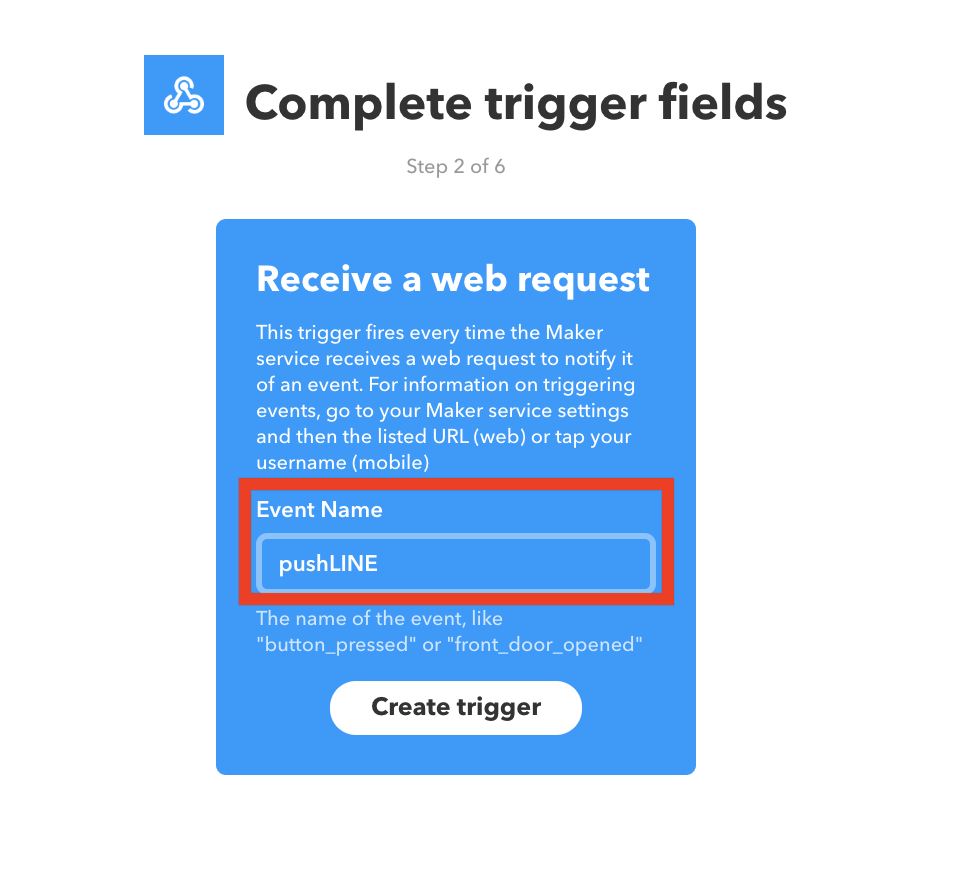
Webhooksを{event}:pushLINEで設定します。

アクション


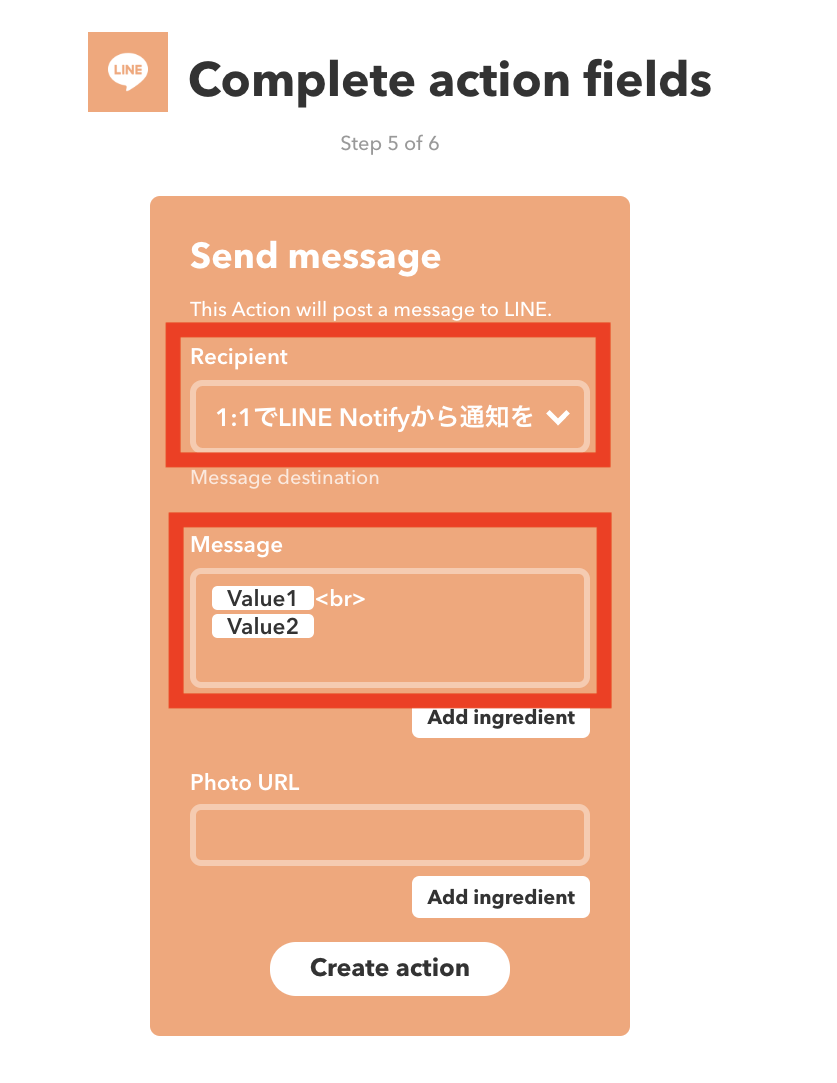
LINE送信のアクションを定義します。
Recipientでラインの送付先を指定します。すでに作成しているLINEのグループにも送信することが出来ます。
Message部分は、自由に変更出来ます。今回は、PHPより2つの引数を渡しているので、2つの引数をMessageに入れております。pushLine('【テスト】',$text);

実行結果

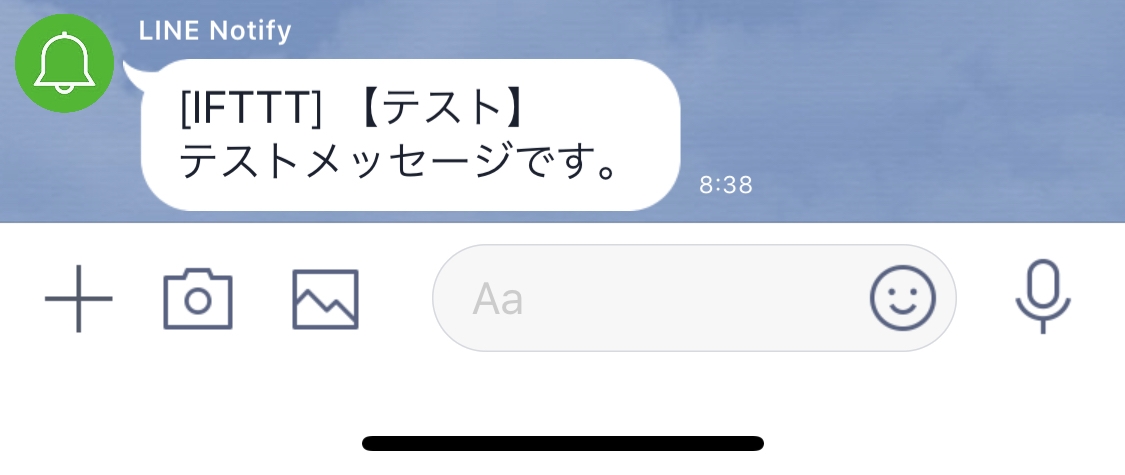
今回のPHPを実行結果は、以下のようなLINEメッセージを受信出来ます。

以上です。色々簡単に使えそうですね。

Raspberry Piの自己証明書SSL作成

自己証明書でなく無料で利用ができるLet's Encript(参考記事(Let's Encrypt導入))を利用したかったのですが、メインのWEBサーバーであるSynologyがPort80を利用しており、現時点のLet's Encrypt証明書を入手するツールにおいて、Port80以外の8080などでhttp通信を待ち受けているサイトでの簡単なSSL証明書作成および入手方法が見つかりませんでした。
手動発行やSynologyからフックさせる方法はありそうでしたが、今後の3ヶ月毎の自動更新などを考え、利用を諦めました。HTTPのポート番号指定「--http-01-port 8080」やHTTPSのポート番号指定「--tls-sni-01-port 4443」を実施しましたが、最初にポート80へのアクセスが発生しておりました。
そこで、 今回は昔ながらの自己証明書作成を実施しました。

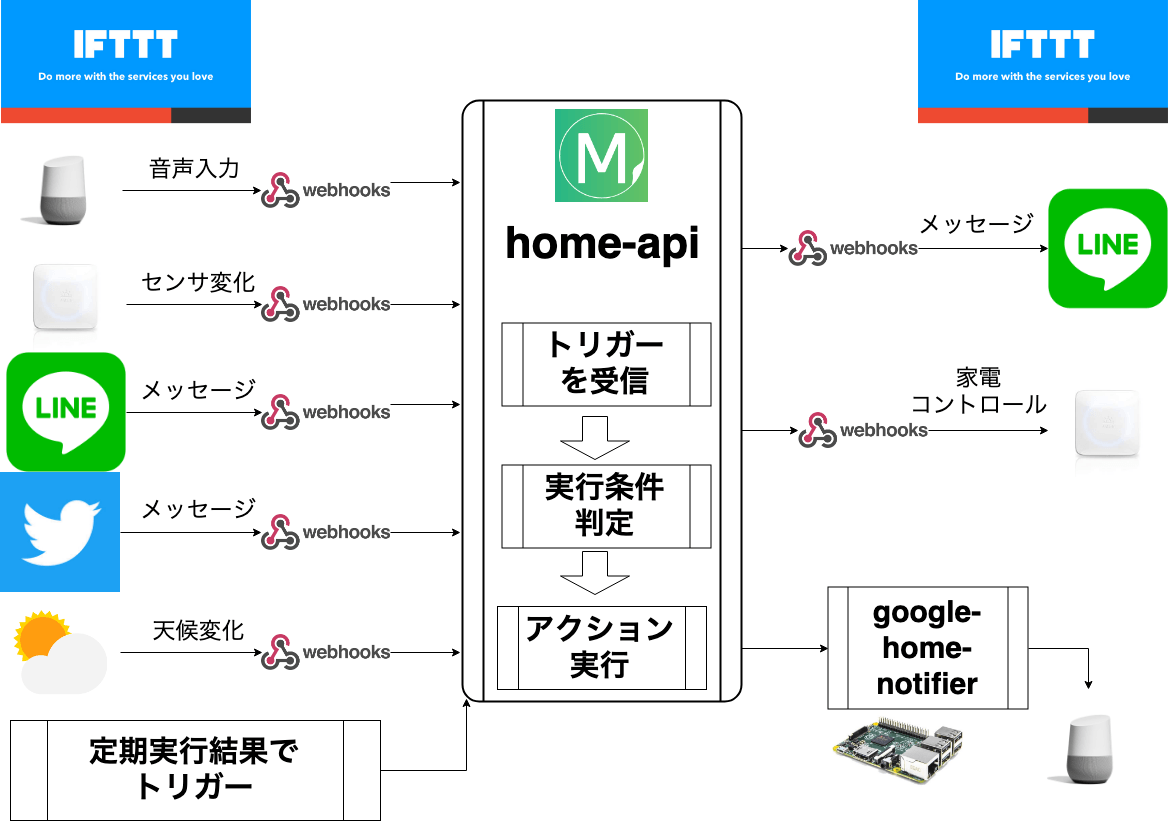
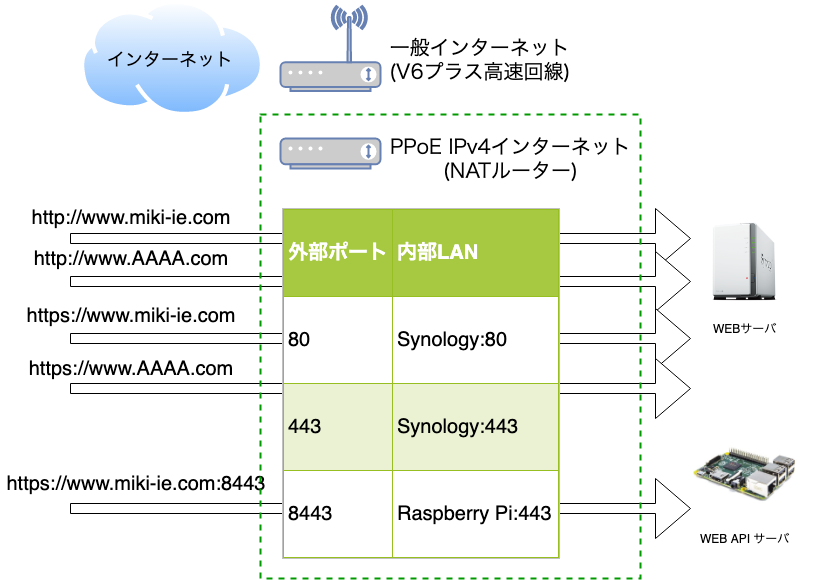
現在運用しているシステム構成イメージ(API連携プラットフォーム
SynologyとRaspbery Piの共存構成イメージ

SSL証明書作成

以下コマンド一覧です。

@raspberrypi:~ $ su -
Password:
root@raspberrypi:~# cd /etc/ssl/private/
root@raspberrypi:/etc/ssl/private# openssl genrsa -aes256 -out server.key 2048
root@raspberrypi:/etc/ssl/private# openssl req -new -days 3650 -key server.key -out server.csr

apacheのSSL関係の構成定義ファイルに作成した証明書を登録します。「/etc/apache2/sites-available/default-ssl.conf」
しかし、現時点で作成したSSLのサーバ証明書はパスワードが設定されているので、apacheサーバ再起動時にパスワード入力が必要となるので、パスワード不要なサーバー証明書を後程作成しなおします。

##change
#SSLCertificateFile /etc/ssl/certs/ssl-cert-snakeoil.pem
#SSLCertificateKeyFile /etc/ssl/private/ssl-cert-snakeoil.key
##change
SSLCertificateFile /etc/ssl/private/server.crt
SSLCertificateKeyFile /etc/ssl/private/server.key

以下、コマンドログです。

@raspberrypi:~ $ su -
Password: 

Wi-Fi is currently blocked by rfkill.
Use raspi-config to set the country before use.

root@raspberrypi:~# cd /etc/ssl/private/
root@raspberrypi:/etc/ssl/private# openssl genrsa -aes256 -out server.key 2048
Generating RSA private key, 2048 bit long modulus (2 primes)
....................................+++++
....................+++++
e is 65537 (0x010001)
Enter pass phrase for server.key:パスワード
Verifying - Enter pass phrase for server.key:パスワード
root@raspberrypi:/etc/ssl/private# 
root@raspberrypi:/etc/ssl/private# openssl req -new -days 3650 -key server.key -out server.csr
Ignoring -days; not generating a certificate
Enter pass phrase for server.key:パスワード
You are about to be asked to enter information that will be incorporated
into your certificate request.
What you are about to enter is what is called a Distinguished Name or a DN.
There are quite a few fields but you can leave some blank
For some fields there will be a default value,
If you enter '.', the field will be left blank.
-----
Country Name (2 letter code) [AU]:JP
State or Province Name (full name) [Some-State]:Tokyo
Locality Name (eg, city) []:Tokyo
Organization Name (eg, company) [Internet Widgits Pty Ltd]:MIKI-IE
Organizational Unit Name (eg, section) []:IT
Common Name (e.g. server FQDN or YOUR name) []:miki-ie.com
Email Address []:mail@192.168.0.108

Please enter the following 'extra' attributes
to be sent with your certificate request
A challenge password []:(空欄)
An optional company name []:(空欄)
root@raspberrypi:/etc/ssl/private# ls
server.csr  server.key  ssl-cert-snakeoil.key
root@raspberrypi:/etc/ssl/private# 
root@raspberrypi:/etc/ssl/private# openssl x509 -in server.csr -out server.crt -req -signkey server.key -days 3650
subject=C = JP, ST = Tokyo, L = Tokyo, O = MIKI-IE, OU = IT, CN = miki-ie.com, emailAddress = mail@192.168.0.108
Getting Private key
Enter pass phrase for server.key:パスワード
root@raspberrypi:/etc/ssl/private# ls
server.crt  server.csr  server.key  ssl-cert-snakeoil.key
root@raspberrypi:/etc/ssl/private# 
root@raspberrypi:/etc/ssl/private# cd /etc/apache2/sites-available/
root@raspberrypi:/etc/apache2/sites-available# ls
000-default.conf  default-ssl.conf
root@raspberrypi:/etc/apache2/sites-available# vi default-ssl.conf 
root@raspberrypi:/etc/apache2/sites-available# cat default-ssl.conf 
<IfModule mod_ssl.c>
        <VirtualHost _default_:4443>
                ServerAdmin webmaster@192.168.0.108

                DocumentRoot /var/www/html

                # Available loglevels: trace8, ..., trace1, debug, info, notice, warn,
                # error, crit, alert, emerg.
                # It is also possible to configure the loglevel for particular
                # modules, e.g.
                #LogLevel info ssl:warn

                ErrorLog ${APACHE_LOG_DIR}/error.log
                CustomLog ${APACHE_LOG_DIR}/access.log combined

                # For most configuration files from conf-available/, which are
                # enabled or disabled at a global level, it is possible to
                # include a line for only one particular virtual host. For example the
                # following line enables the CGI configuration for this host only
                # after it has been globally disabled with "a2disconf".
                #Include conf-available/serve-cgi-bin.conf

                #   SSL Engine Switch:
                #   Enable/Disable SSL for this virtual host.
                SSLEngine on

                #   A self-signed (snakeoil) certificate can be created by installing
                #   the ssl-cert package. See
                #   /usr/share/doc/apache2/README.Debian.gz for more info.
                #   If both key and certificate are stored in the same file, only the
                #   SSLCertificateFile directive is needed.
#SSLCertificateFile     /etc/ssl/certs/ssl-cert-snakeoil.pem
#SSLCertificateKeyFile /etc/ssl/private/ssl-cert-snakeoil.key
##miki
SSLCertificateFile /etc/ssl/private/server.crt
SSLCertificateKeyFile /etc/ssl/private/server.key

                #   Server Certificate Chain:
                #   Point SSLCertificateChainFile at a file containing the
                #   concatenation of PEM encoded CA certificates which form the
                #   certificate chain for the server certificate. Alternatively
                #   the referenced file can be the same as SSLCertificateFile
                #   when the CA certificates are directly appended to the server
                #   certificate for convinience.
                #SSLCertificateChainFile /etc/apache2/ssl.crt/server-ca.crt

                #   Certificate Authority (CA):
                #   Set the CA certificate verification path where to find CA
                #   certificates for client authentication or alternatively one
                #   huge file containing all of them (file must be PEM encoded)
                #   Note: Inside SSLCACertificatePath you need hash symlinks
                #                to point to the certificate files. Use the provided
                #                Makefile to update the hash symlinks after changes.
                #SSLCACertificatePath /etc/ssl/certs/
                #SSLCACertificateFile /etc/apache2/ssl.crt/ca-bundle.crt

                #   Certificate Revocation Lists (CRL):
                #   Set the CA revocation path where to find CA CRLs for client
                #   authentication or alternatively one huge file containing all
                #   of them (file must be PEM encoded)
                #   Note: Inside SSLCARevocationPath you need hash symlinks
                #                to point to the certificate files. Use the provided
                #                Makefile to update the hash symlinks after changes.
                #SSLCARevocationPath /etc/apache2/ssl.crl/
                #SSLCARevocationFile /etc/apache2/ssl.crl/ca-bundle.crl

                #   Client Authentication (Type):
                #   Client certificate verification type and depth.  Types are
                #   none, optional, require and optional_no_ca.  Depth is a
                #   number which specifies how deeply to verify the certificate
                #   issuer chain before deciding the certificate is not valid.
                #SSLVerifyClient require
                #SSLVerifyDepth  10

                #   SSL Engine Options:
                #   Set various options for the SSL engine.
                #   o FakeBasicAuth:
                #        Translate the client X.509 into a Basic Authorisation.  This means that
                #        the standard Auth/DBMAuth methods can be used for access control.  The
                #        user name is the `one line' version of the client's X.509 certificate.
                #        Note that no password is obtained from the user. Every entry in the user
                #        file needs this password: `xxj31ZMTZzkVA'.
                #   o ExportCertData:
                #        This exports two additional environment variables: SSL_CLIENT_CERT and
                #        SSL_SERVER_CERT. These contain the PEM-encoded certificates of the
                #        server (always existing) and the client (only existing when client
                #        authentication is used). This can be used to import the certificates
                #        into CGI scripts.
                #   o StdEnvVars:
                #        This exports the standard SSL/TLS related `SSL_*' environment variables.
                #        Per default this exportation is switched off for performance reasons,
                #        because the extraction step is an expensive operation and is usually
                #        useless for serving static content. So one usually enables the
                #        exportation for CGI and SSI requests only.
                #   o OptRenegotiate:
                #        This enables optimized SSL connection renegotiation handling when SSL
                #        directives are used in per-directory context.
                #SSLOptions +FakeBasicAuth +ExportCertData +StrictRequire
                <FilesMatch "\.(cgi|shtml|phtml|php)$">
                                SSLOptions +StdEnvVars
                </FilesMatch>
                <Directory /usr/lib/cgi-bin>
                                SSLOptions +StdEnvVars
                </Directory>

                #   SSL Protocol Adjustments:
                #   The safe and default but still SSL/TLS standard compliant shutdown
                #   approach is that mod_ssl sends the close notify alert but doesn't wait for
                #   the close notify alert from client. When you need a different shutdown
                #   approach you can use one of the following variables:
                #   o ssl-unclean-shutdown:
                #        This forces an unclean shutdown when the connection is closed, i.e. no
                #        SSL close notify alert is send or allowed to received.  This violates
                #        the SSL/TLS standard but is needed for some brain-dead browsers. Use
                #        this when you receive I/O errors because of the standard approach where
                #        mod_ssl sends the close notify alert.
                #   o ssl-accurate-shutdown:
                #        This forces an accurate shutdown when the connection is closed, i.e. a
                #        SSL close notify alert is send and mod_ssl waits for the close notify
                #        alert of the client. This is 100% SSL/TLS standard compliant, but in
                #        practice often causes hanging connections with brain-dead browsers. Use
                #        this only for browsers where you know that their SSL implementation
                #        works correctly.
                #   Notice: Most problems of broken clients are also related to the HTTP
                #   keep-alive facility, so you usually additionally want to disable
                #   keep-alive for those clients, too. Use variable "nokeepalive" for this.
                #   Similarly, one has to force some clients to use HTTP/1.0 to workaround
                #   their broken HTTP/1.1 implementation. Use variables "downgrade-1.0" and
                #   "force-response-1.0" for this.
                # BrowserMatch "MSIE [2-6]" \
                #               nokeepalive ssl-unclean-shutdown \
                #               downgrade-1.0 force-response-1.0

        </VirtualHost>
</IfModule>

root@raspberrypi:/etc/apache2/sites-available# service apache2 restart
Enter passphrase for SSL/TLS keys for 127.0.1.1:4443 (RSA): *******

apache2/httpサービス再起動時にパスワード入力不要とする

  1. 現在のserver証明書のバックアップ
  2. パスワード無しの証明書を作成

元ファイルのバックアップ

# cp server.key server.key.org

パスフレーズの解除

# openssl rsa -in server.key -out server.key
apache2サービスを再起動し、パスワードが要求されないことを確認し、すべての手順終了です。

Google Homeへの音声コマンドをIFTTTトリガーへ

Google Assistantに「OK グーグル」とコマンド受付状態にし、その後利用したい色々な音声コマンドを設定します。

トリガー:「OK グーグル」「ゆうまの部屋のパソコンをシャットダウンして」
アクション:パソコンのシャットダウンを実行

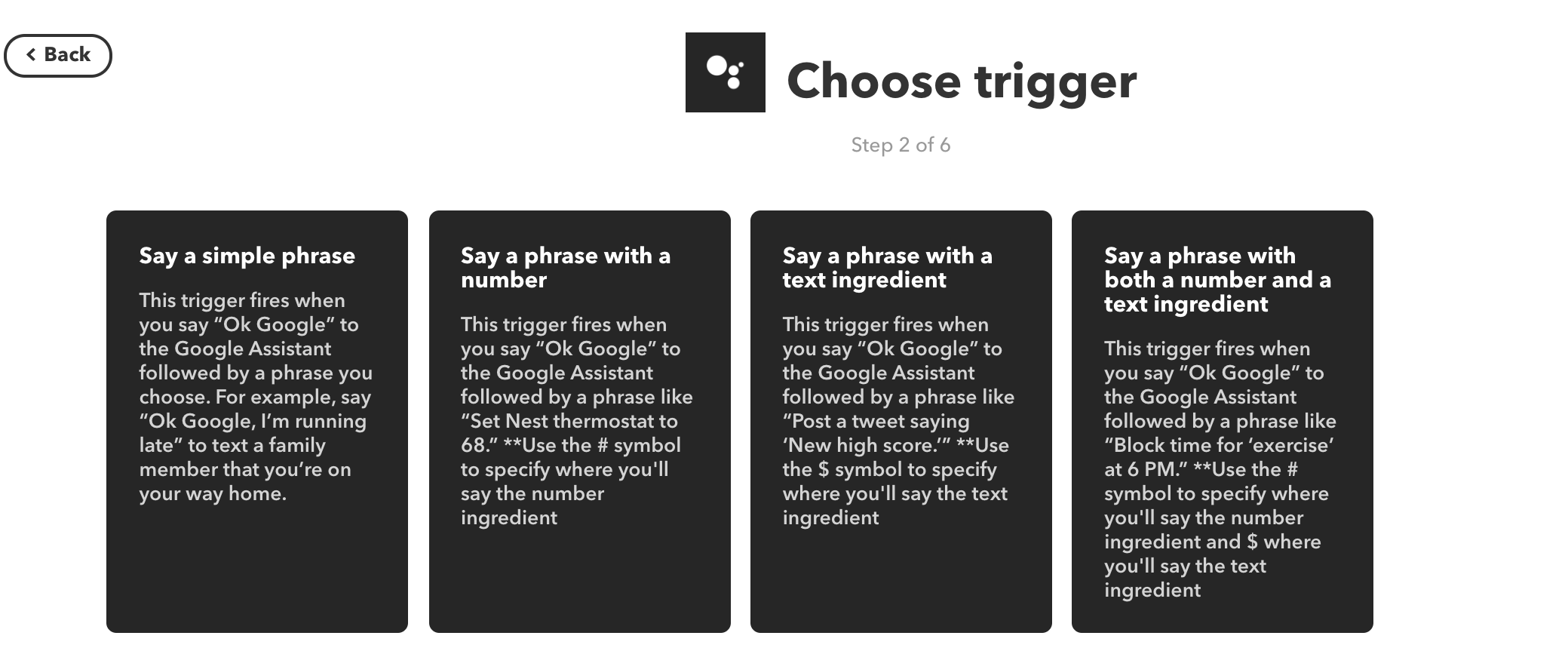
Google Home Assistant向けのTriggerは4種類

  • 定形メッセージ
  • 定形メッセージ+数字
  • 定形メッセージ+不定形メッセージ
  • 定型メッセージ+数字+不定形メッセージ

以下が、トリガーの一覧となります。それぞれ配置し、少し操作すれば、利用方法は分かると思います。日本語での紹介サイトも多くあるので、必要に応じてGoogle検索で情報を探して下さい。(このサイトでもユースケースとして各種具体的な利用方法として記載します)

トリガーへの設定

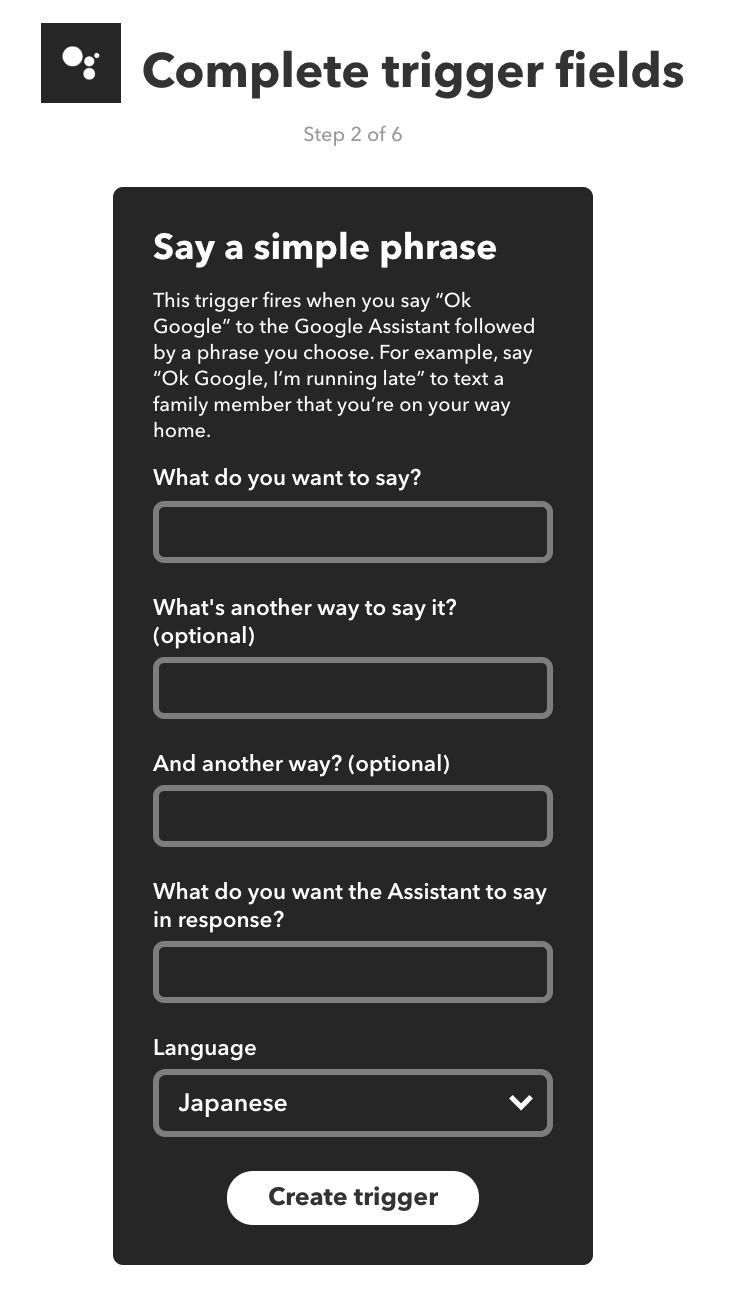
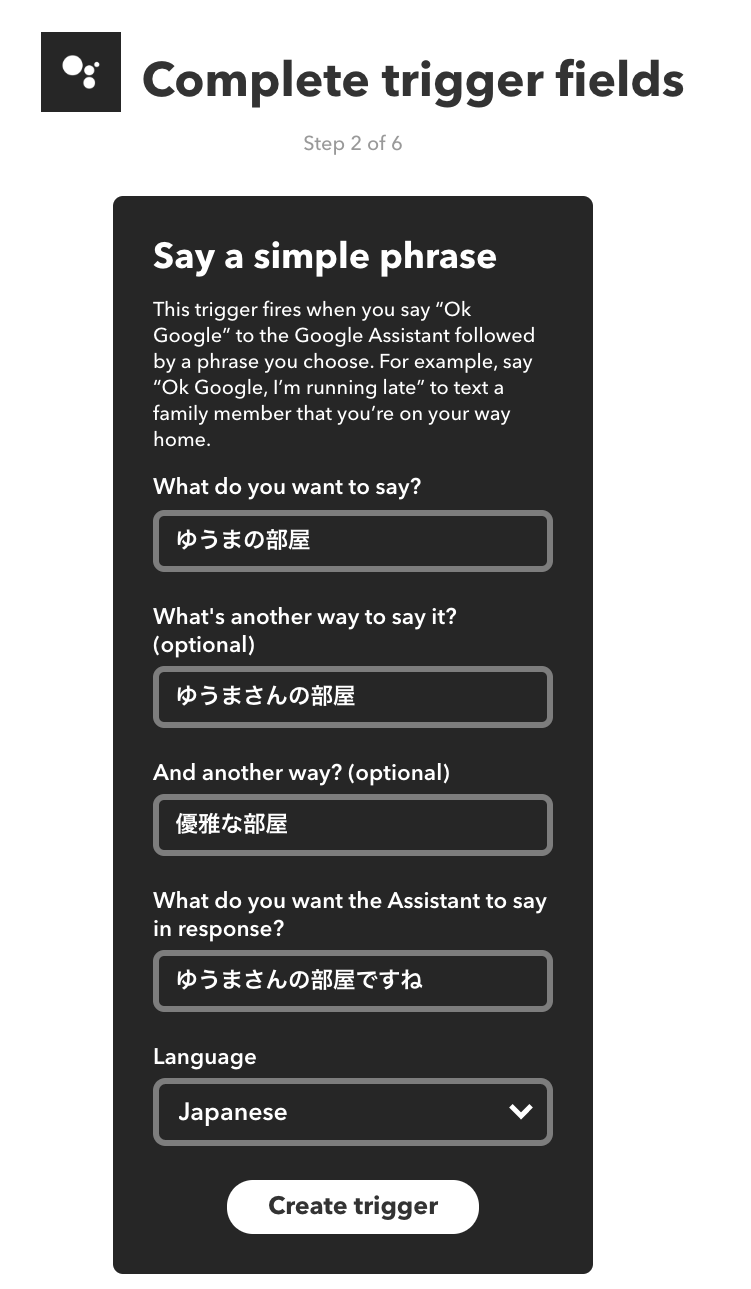
定形メッセージの登録画面です。

1番目の「What do you want to say ?」から3番目の「And another way ?」までは、コマンドとして登録したい内容を記載します。3つの言い方が登録出来ます。
4番目は、コマンド受付時のGoogle Assistantからの返答です。空欄でも問題ないです。「○○を了解しました。」などを登録します。
最後は、利用言語となります。

Google Assistantの日本語認識

実際に、Google Assistantに話しかけ、Google Assistantがどのように日本語認識をしているか確認し、確認結果をもとにIFTTTトリガーへの命令として指定することをオススメします。
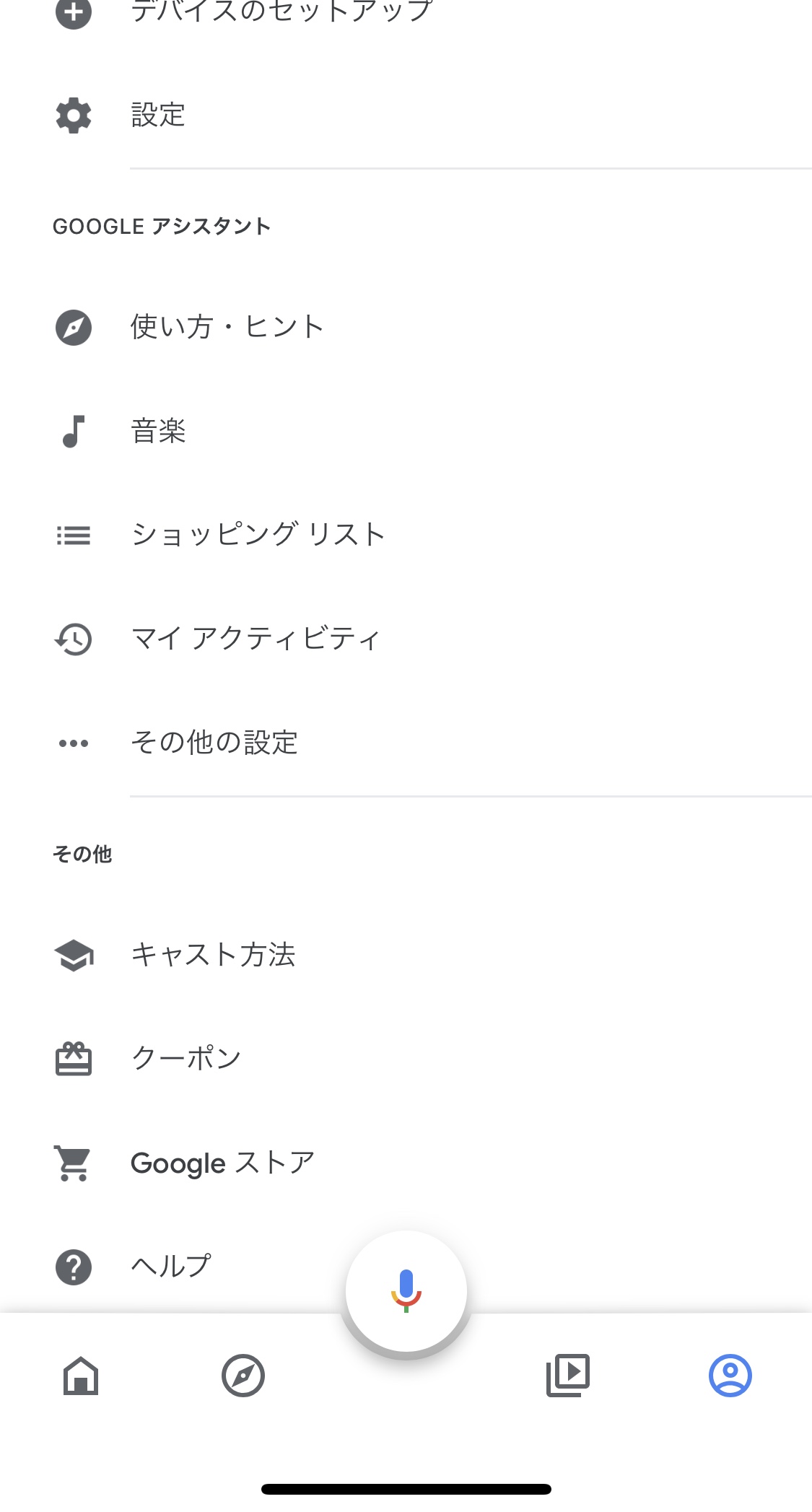
以下のGoogle Homeアプリの「マイアクティビティ」で発音した音声コマンドの履歴が見れます。

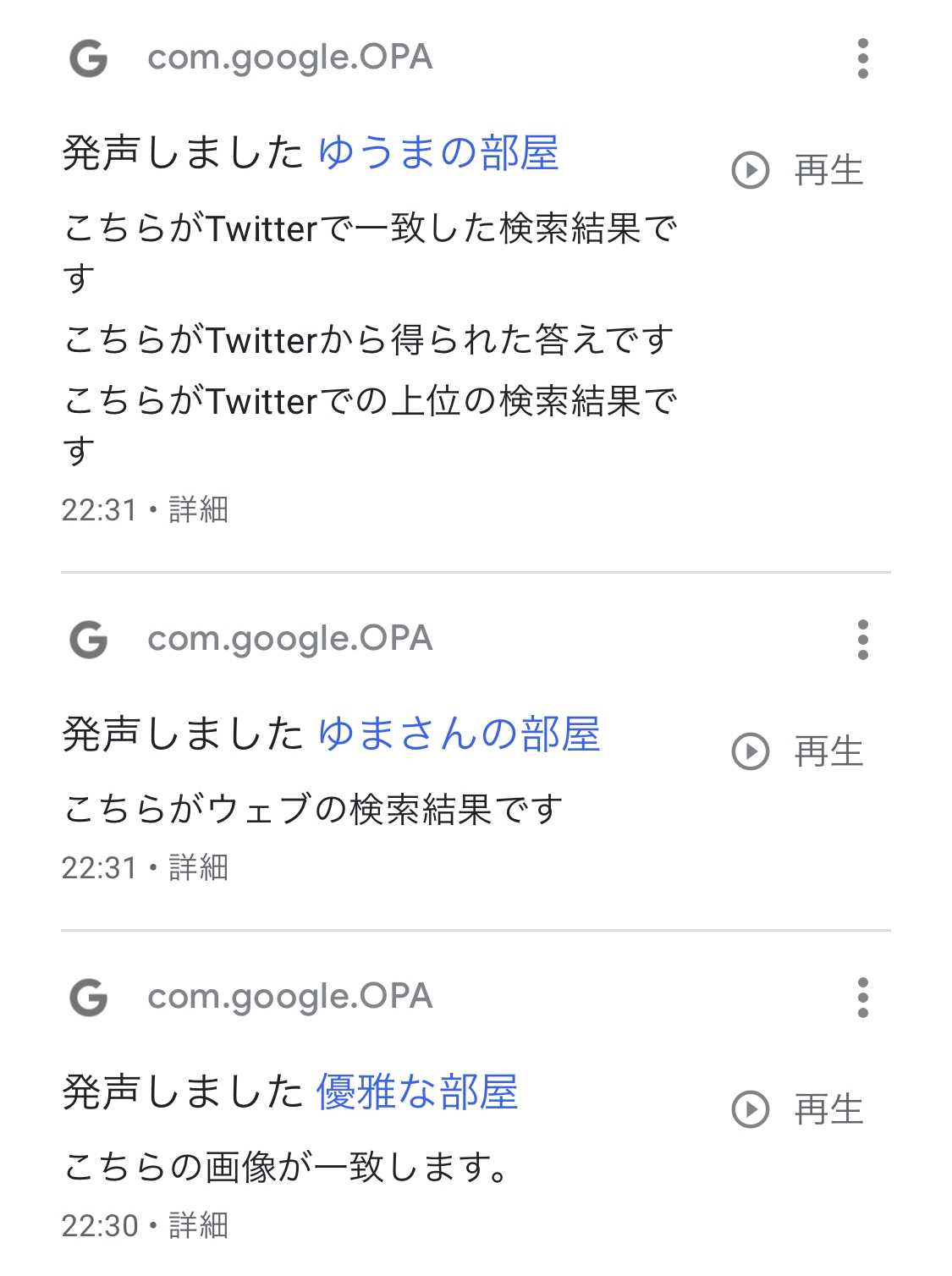
実際に「ゆうまの部屋」と発音した際の認識状況

「ゆうまの部屋」「優雅な部屋」「優馬の部屋」と漢字の変換方法の違い含め、複数パターンの認識結果となります。誤認識が少ない単語や文章の選択が必要となります。

Google Assistantの認識結果を参考に登録したトリーがサンプル

V1を公開しました

2019年7月7日、残念ながら雨の七夕です。

かなり昔にフリーソフトを何個か公開しておりました。
窓の杜様などにも取り上げられたこともありました。

学生でもなく時間も限られる中、簡単にソフトウェアが作れる時代であることを再認識しました。1カ月弱で、デジタル環境を、ここまで生活に浸透出来るのだなーと

Raspberry PiやGoogle Homeなど生活に溶け込むガジェットも手軽に入手可能と、ソフトウェア+アルファでアイデアが簡単に実現できる素晴らしい環境です。

まずは、各種ツールなどの勉強ができたので、他の実現したいアイデアに取り組む予定です。出来たら、他のサイトで記事化されていないような内容に取り組めたらと思います。実装やプログラミングは簡単に、世の中にある便利なものを組み合わせて。
当面は、各ユースケースの説明記事を日々投稿して行きます。
(書き留めた記事があるので、実際にはV2の開発に入ります)

V1リリース内容について

PCをリモート起動するためにWOL導入

Wake On LAN とは、ネットワーク経由でパソコンの電源をオンにする機能のことです。よく、WOLと省略されます。

Wake on LANについては、パソコンのBIOS やWindowsの設定が必要で、Wake on LANに対応したパソコンやマザーボードが必要となります。
他のパソコンからの起動を命じる信号(Magic Packet)を、LAN経由で接続されたWake On LANに対応したネットワークアダプタを装着しているパソコンが受信するとこのMagic Packetを受信したほうのパソコンの電源がオンとなります。

Raspberry PiよりMagic Packetを送信するために「etherwake」をインストール

以下のコマンドで「etherwake」をインストール

$ sudo apt-get update
$ sudo apt-get install etherwake
$ which etherwake
/usr/sbin/etherwake

以下、インストール時のコンソールです。

@raspberrypi:~ $ apt-cache search wake on lan
between - game about consciousness and isolation
crossroads - open source load balance and fail over utility for TCP based services
desktop-autoloader - Accelerate Diskless Workstation systems by pre-loading a dummy Desktop Session
etherwake - tool to send magic Wake-on-LAN packets
fusioninventory-for-glpi - FusionInventory Server embedded as a plugin into GLPI
golang-github-danwakefield-fnmatch-dev - Updated clone of kballard’s fnmatch(3) implementation for Go
gwakeonlan - wakes up your machines using Wake on LAN
shutdown-at-night - System to shut down clients at night, and wake them in the morning
wakeonlan - Sends 'magic packets' to wake-on-LAN enabled ethernet adapters
@raspberrypi:~ $ sudo apt-get update
@raspberrypi:~ $ sudo apt-get install etherwake

パッケージリストを読み込んでいます... 完了
依存関係ツリーを作成しています 
状態情報を読み取っています... 完了
以下の追加パッケージがインストールされます:
wakeonlan
以下のパッケージが新たにインストールされます:
etherwake wakeonlan
アップグレード: 0 個、新規インストール: 2 個、削除: 0 個、保留: 19 個。
19.6 kB のアーカイブを取得する必要があります。
この操作後に追加で 42.0 kB のディスク容量が消費されます。
続行しますか? [Y/n] y
取得:1 http://ftp.jaist.ac.jp/pub/Linux/raspbian-archive/raspbian buster/main armhf etherwake armhf 1.09-4 [9,112 B]
取得:2 http://ftp.jaist.ac.jp/pub/Linux/raspbian-archive/raspbian buster/main armhf wakeonlan all 0.41-12 [10.5 kB]
19.6 kB を 2秒 で取得しました (12.4 kB/s)
以前に未選択のパッケージ etherwake を選択しています。
(データベースを読み込んでいます ... 現在 145425 個のファイルとディレクトリがインストールされています。)
.../etherwake_1.09-4_armhf.deb を展開する準備をしています ...
etherwake (1.09-4) を展開しています...
以前に未選択のパッケージ wakeonlan を選択しています。
.../wakeonlan_0.41-12_all.deb を展開する準備をしています ...
wakeonlan (0.41-12) を展開しています...
wakeonlan (0.41-12) を設定しています ...
etherwake (1.09-4) を設定しています ...
man-db (2.8.5-2) のトリガを処理しています ...
@raspberrypi:~ $ which etherwake
/usr/sbin/etherwake
@raspberrypi:~ $ etherwake -u
usage: etherwake [-i <ifname>] [-p aa:bb:cc:dd[:ee:ff]] 00:11:22:33:44:55

PHPよりetherwakeコマンドを実行

参考URL:GoogleHome で PCを起動( IFTTT / Webhook / Wake-on-LAN)

PHPを実行するapacheユーザーからsudoパスワード無しに、etherwakeが実行可能となりように設定します。

$ sudo visudo

apache ALL=(ALL) NOPASSWD: /usr/sbin/etherwake
www-data ALL=(root) NOPASSWD: ALL

以下が、「etherwake」を実行する際のPHPソースコードとなります。
関数として準備し、引数でLANカードのMACアドレスを引数で渡すようにしております。

function powerOn($MAC) {
	$cmd = 'sudo /usr/sbin/etherwake '.$MAC;
	$output =  shell_exec($cmd);
}

//powerOn実行
powerON("xx:xx:xx:xx:xx:xx");


PHPのSSH2インストール

Raspberry Piで以下のSSH2を利用するスクリプトを実行した際に、エラーが出ました。
[Sat Jul 06 17:32:35.669744 2019] [php7:error] PHP Fatal error: Uncaught Error: Call to undefined function ssh2_connect() in /var/www/

Call to undefined function ssh2_connect()とあったので、「php-ssh2」をインストールすることで、PHPでSSH2を利用できます。

$connection = ssh2_connect($target_ip);
ssh2_auth_password($connection, $target_user, $target_pass);
$stream = ssh2_exec($connection, $cmd);
$errorstream = ssh2_fetch_stream($stream, SSH2_STREAM_STDERR);
stream_set_blocking($stream, true);
stream_set_blocking($errorstream, true);
以下、実際の操作ログです。
Apache経由で利用する際は、apacheの再起動を実施後、利用してください。
@raspberrypi:~ $ sudo apt-cache search libss
[sudo]スワード:
cl-plus-ssl - Common Lisp interface to OpenSSL
dcmtk - OFFIS DICOM toolkit command line utilities
dlang-openssl - D version of the C headers for openssl
lib32gcc-6-dev-amd64-cross - GCC support library (32 bit development files)
lib32gcc-6-dev-mips64el-cross - GCC support library (32 bit development files)
lib32gcc-6-dev-s390x-cross - GCC support library (32 bit development files)
lib32gcc-8-dev-amd64-cross - GCC support library (32 bit development files)
lib32gcc-8-dev-mips64-cross - GCC support library (32 bit development files)
lib32gcc-8-dev-mips64el-cross - GCC support library (32 bit development files)
lib32gcc-8-dev-mips64r6-cross - GCC support library (32 bit development files)
lib32gcc-8-dev-mips64r6el-cross - GCC support library (32 bit development files)
lib32gcc-8-dev-ppc64-cross - GCC support library (32 bit development files)
lib32gcc-8-dev-s390x-cross - GCC support library (32 bit development files)
lib32gcc-8-dev-sparc64-cross - GCC support library (32 bit development files)
lib32gcc-8-dev-x32-cross - GCC support library (32 bit development files)
lib64gcc-6-dev-i386-cross - GCC support library (64bit development files)
lib64gcc-6-dev-mips-cross - GCC support library (64bit development files)
lib64gcc-6-dev-mipsel-cross - GCC support library (64bit development files)
lib64gcc-8-dev-i386-cross - GCC support library (64bit development files)
lib64gcc-8-dev-mips-cross - GCC support library (64bit development files)
lib64gcc-8-dev-mipsel-cross - GCC support library (64bit development files)
lib64gcc-8-dev-mipsr6-cross - GCC support library (64bit development files)
lib64gcc-8-dev-mipsr6el-cross - GCC support library (64bit development files)
lib64gcc-8-dev-powerpc-cross - GCC support library (64bit development files)
lib64gcc-8-dev-x32-cross - GCC support library (64bit development files)
libdcmtk-dev - OFFIS DICOM toolkit development libraries and headers
libdcmtk14 - OFFIS DICOM toolkit runtime libraries
libgcc-4.9-dev - GCC support library (development files)
libgcc-5-dev - GCC support library (development files)
libgcc-6-dev - GCC support library (development files)
libgcc-6-dev-amd64-cross - GCC support library (development files)
libgcc-6-dev-arm64-cross - GCC support library (development files)
libgcc-6-dev-armel-cross - GCC support library (development files)
libgcc-6-dev-armhf-cross - GCC support library (development files)
libgcc-6-dev-i386-cross - GCC support library (development files)
libgcc-6-dev-mips-cross - GCC support library (development files)
libgcc-6-dev-mips64el-cross - GCC support library (development files)
libgcc-6-dev-mipsel-cross - GCC support library (development files)
libgcc-6-dev-ppc64el-cross - GCC support library (development files)
libgcc-6-dev-s390x-cross - GCC support library (development files)
libgcc-7-dev - GCC support library (development files)
libgcc-8-dev - GCC support library (development files)
libgcc-8-dev-alpha-cross - GCC support library (development files)
libgcc-8-dev-amd64-cross - GCC support library (development files)
libgcc-8-dev-arm64-cross - GCC support library (development files)
libgcc-8-dev-armel-cross - GCC support library (development files)
libgcc-8-dev-armhf-cross - GCC support library (development files)
libgcc-8-dev-hppa-cross - GCC support library (development files)
libgcc-8-dev-i386-cross - GCC support library (development files)
libgcc-8-dev-m68k-cross - GCC support library (development files)
libgcc-8-dev-mips-cross - GCC support library (development files)
libgcc-8-dev-mips64-cross - GCC support library (development files)
libgcc-8-dev-mips64el-cross - GCC support library (development files)
libgcc-8-dev-mips64r6-cross - GCC support library (development files)
libgcc-8-dev-mips64r6el-cross - GCC support library (development files)
libgcc-8-dev-mipsel-cross - GCC support library (development files)
libgcc-8-dev-mipsr6-cross - GCC support library (development files)
libgcc-8-dev-mipsr6el-cross - GCC support library (development files)
libgcc-8-dev-powerpc-cross - GCC support library (development files)
libgcc-8-dev-powerpcspe-cross - GCC support library (development files)
libgcc-8-dev-ppc64-cross - GCC support library (development files)
libgcc-8-dev-ppc64el-cross - GCC support library (development files)
libgcc-8-dev-riscv64-cross - GCC support library (development files)
libgcc-8-dev-s390x-cross - GCC support library (development files)
libgcc-8-dev-sh4-cross - GCC support library (development files)
libgcc-8-dev-sparc64-cross - GCC support library (development files)
libgcc-8-dev-x32-cross - GCC support library (development files)
libn32gcc-6-dev-mips-cross - GCC support library (n32 development files)
libn32gcc-6-dev-mips64el-cross - GCC support library (n32 development files)
libn32gcc-6-dev-mipsel-cross - GCC support library (n32 development files)
libn32gcc-8-dev-mips-cross - GCC support library (n32 development files)
libn32gcc-8-dev-mips64-cross - GCC support library (n32 development files)
libn32gcc-8-dev-mips64el-cross - GCC support library (n32 development files)
libn32gcc-8-dev-mips64r6-cross - GCC support library (n32 development files)
libn32gcc-8-dev-mips64r6el-cross - GCC support library (n32 development files)
libn32gcc-8-dev-mipsel-cross - GCC support library (n32 development files)
libn32gcc-8-dev-mipsr6-cross - GCC support library (n32 development files)
libn32gcc-8-dev-mipsr6el-cross - GCC support library (n32 development files)
libnet-ssh2-perl - Perl module for the SSH 2 protocol
librust-libgit2-sys+libssh2-sys-dev - Native bindings to the libgit2 library - feature "libssh2-sys"
librust-libssh2-sys-dev - Native bindings to the libssh2 library - Rust source code
libss2 - command-line interface parsing library
libss7-2.0 - Signalling System 7 (ss7) library
libss7-dev - Signalling System 7 (ss7) development files
libsscm-dev - Development library for sigscheme Scheme interpreter
libsscm3 - Shared library for sigscheme Scheme interpreter
libssh-4 - tiny C SSH library (OpenSSL flavor)
libssh-dev - tiny C SSH library - Development files (OpenSSL flavor)
libssh-doc - tiny C SSH library - Documentation files
libssh-gcrypt-4 - tiny C SSH library (gcrypt flavor)
libssh-gcrypt-dev - tiny C SSH library - Development files (gcrypt flavor)
libssh2-1 - SSH2 client-side library
libssh2-1-dev - SSH2 client-side library (development headers)
libssl-dev - Secure Sockets Layer toolkit - development files
libssl-doc - Secure Sockets Layer toolkit - development documentation
libssl-ocaml - OCaml bindings for OpenSSL (runtime)
libssl-ocaml-dev - OCaml bindings for OpenSSL
libssl-utils-clojure - library for SSL certificate management on the JVM
libssl1.0-dev - Secure Sockets Layer toolkit - development files
libssl1.0.2 - Secure Sockets Layer toolkit - shared libraries
libssl1.1 - Secure Sockets Layer toolkit - shared libraries
libssm-bin - macromolecular superposition library - binaries
libssm-dev - macromolecular superposition library - development files
libssm2 - macromolecular superposition library - runtime
libsss-certmap-dev - Certificate mapping library for SSSD -- development files
libsss-certmap0 - Certificate mapping library for SSSD
libsss-idmap-dev - ID mapping library for SSSD -- development files
libsss-idmap0 - ID mapping library for SSSD
libsss-nss-idmap-dev - SID based lookups library for SSSD -- development files
libsss-nss-idmap0 - SID based lookups library for SSSD
libsss-simpleifp-dev - SSSD D-Bus responder helper library -- development files
libsss-simpleifp0 - SSSD D-Bus responder helper library
libsss-sudo - Communicator library for sudo
libx32gcc-6-dev-amd64-cross - GCC support library (x32 development files)
libx32gcc-6-dev-i386-cross - GCC support library (x32 development files)
libx32gcc-8-dev-amd64-cross - GCC support library (x32 development files)
libx32gcc-8-dev-i386-cross - GCC support library (x32 development files)
perl-openssl-defaults - version compatibility baseline for Perl OpenSSL packages
php-ssh2 - Bindings for the libssh2 library
python-libssh2 - Python binding for libssh2 library
python-libsss-nss-idmap - Python bindings for the SID lookups library
python3-libsss-nss-idmap - Python3 bindings for the SID lookups library
r-cran-openssl - GNU R toolkit for encryption, signatures and certificates based on OpenSSL
ssh-audit - tool for ssh server auditing
tcode - create a Java file from an associated LaTex file
@raspberrypi:~ $ sudo apt-get update
@raspberrypi:~ $ sudo apt-get install php-ssh2
@raspberrypi:~ $ sudo service apache2 restart

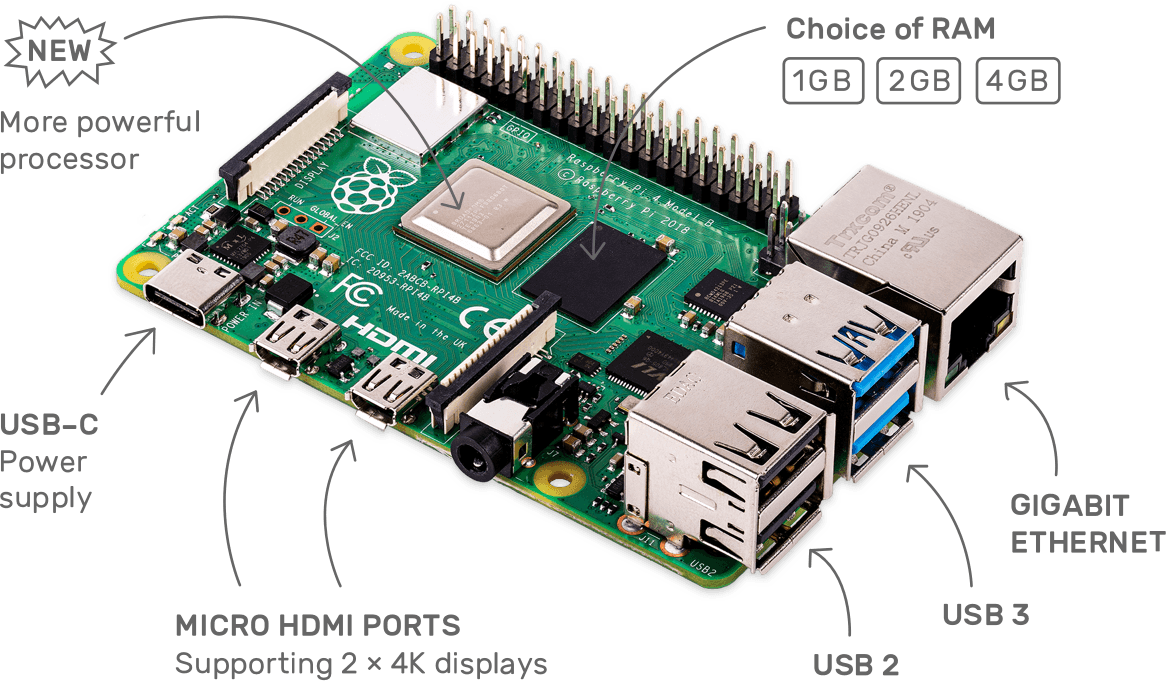
Raspberry Pi 4概要

SoC(システムオンチップ)の変更。Cortex-A72アーキテクチャ(64ビットのクアッドコアARMv8が1.5GHz)を採用。

  • H.265のハードウェアビデオデコーディング
  • 基本モデルは1GBのRAM、2GBと4GBのRAMを搭載するモデルをラインナップ
  • メモリ規格がLPDDR2からLPDDR4に更新
  • Gigabit Ethernet搭載(Gigabit Ethernet over USB 2.0からの変更)
  • USB 3.0×2とUSB 2.0×2
  • 電源用USB-Cポート装備
  • Bluetoothも、4.2から5.0にアップデート
  • 2つのmicro-HDMIポート(フルサイズのHDMIポートからの変更)
  • 2つの4Kディスプレイを、60fpsで接続可能

Raspberry Piの正規販売店によって米国時間6月23日に発売された。メモリが1GBのベースモデルの価格は35ドル。RAMが2GBのモデルは45ドル、4GBのモデルは55ドル。

Raspberry Pi 4 BとRaspberry Pi 3 B +比較

海外サイトで見つけたベンチマーク結果です。
個人的に気にしていた消費電力ですが、想定以上の優秀な結果。導入しても良いかなと思える結果です。

テスト項目Raspberry Pi 3 B +Raspberry Pi 4 B差分
起動時間39.941.74.51%
アイドル状態(消費電力)0.5050.68435.45%
ピーク状態(消費電力)1.141.12-1.75%
CPUベンチマーク(1スレッド)317.7250.4-21.18%
CPUベンチマーク(4スレッド)86.262.8-27.15%
RAMベンチマーク14202983110.07%
OpenGL30.935.815.86%
Ethernet332933181.02%
WiFi 2.4Ghz38.639.62.59%
WiFi 5Ghz98.61078.52%
USB Drive Write35155342.86%
USB Drive Read32233628.13%

大幅な入出力の増強。発熱は少し気になるものの、魅力ある製品だと思います。
また、イノベーションと呼べるモデルチェンジだと思います。

Webhooksの利用

Webhooksは、WEB APIとなります。
Webhook(Webコールバック、HTTPプッシュAPIなど)はあるアプリケーションから別のアプリケーションに対してリアルタイムな情報提供を実現するための仕組みです。
Web/URLアクセスを行います。
Webhooksは、WEB受信とWEB送信側の機能を実現出来ます。

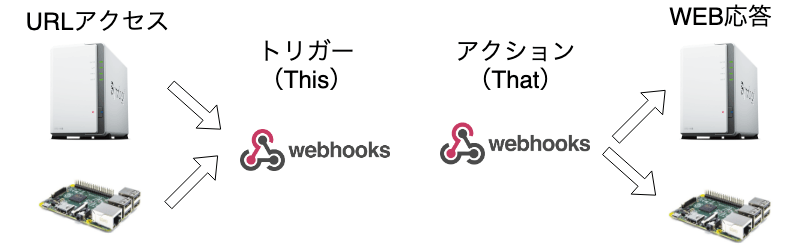
  1. SynologyやRaspberry PiからのURLアクセスを受け付けるWebhook
  2. WebhookからSynologyやRaspberry PiへアクセスするWebhook

の2つの利用形態があります。

IFTTTは、「if(もし) this(この状態) then(の場合は) that(それをする)」なので、
Synologyなどが、IFTTT処理の実行を開始させたい場合は、SynologyよりWebhookを実行します。(SynologyよりWebhookにURLアクセスします)

IFTTT処理でアクションさせたい処理がSynology側などにある場合は、WebhookよりSynologyへURLアクセスさせます。

トリガー(That)

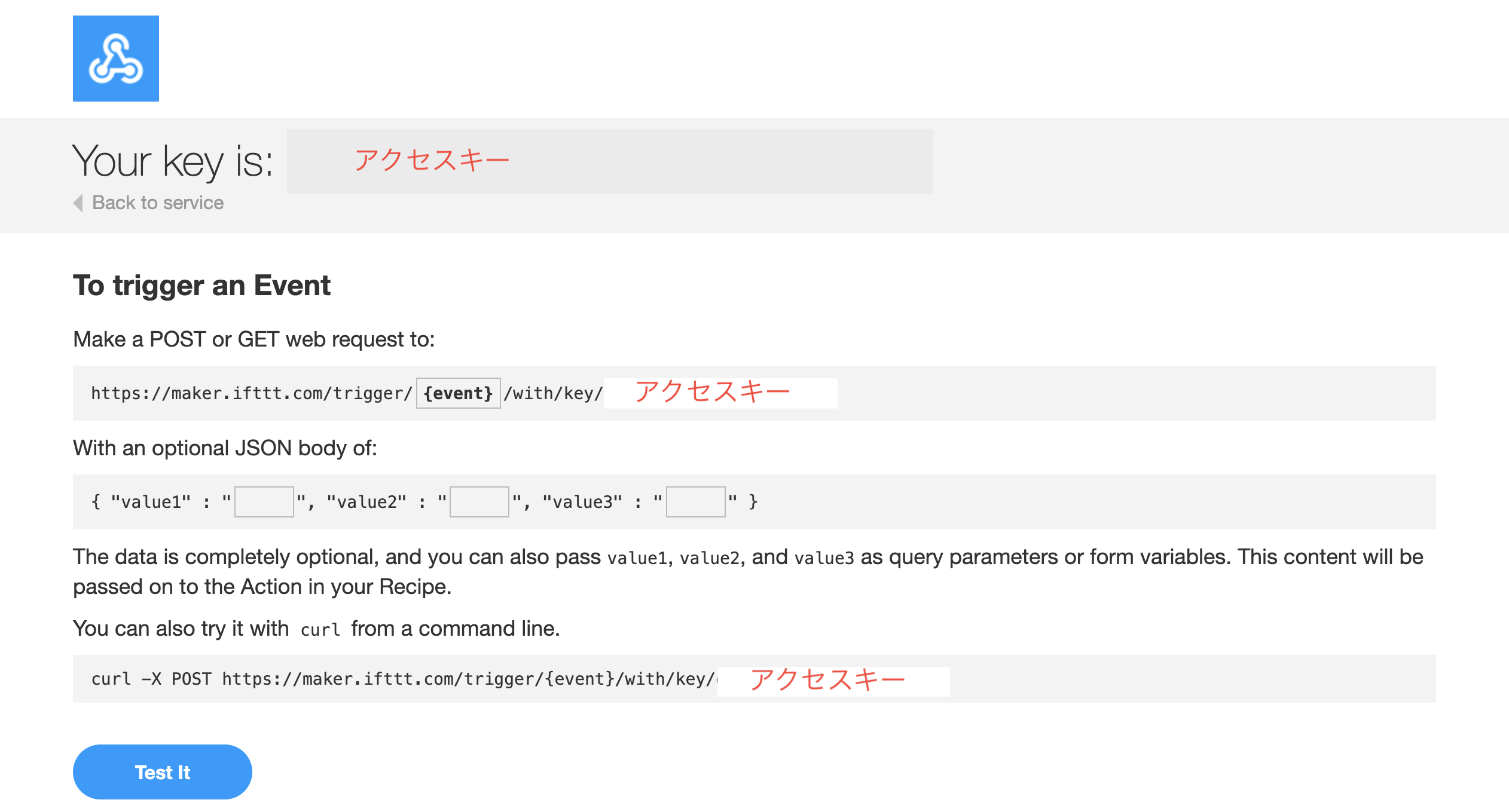
外部よりWebhookにURLアクセスする必要があります。
その際のアクセスするURLや、アクセスに必要なアクセスキーは、Webhooksの「Documation」画面より入手可能です。
{event}はトリガーごとに設定するので、IFTTTでレシピを作成する際に指定します。

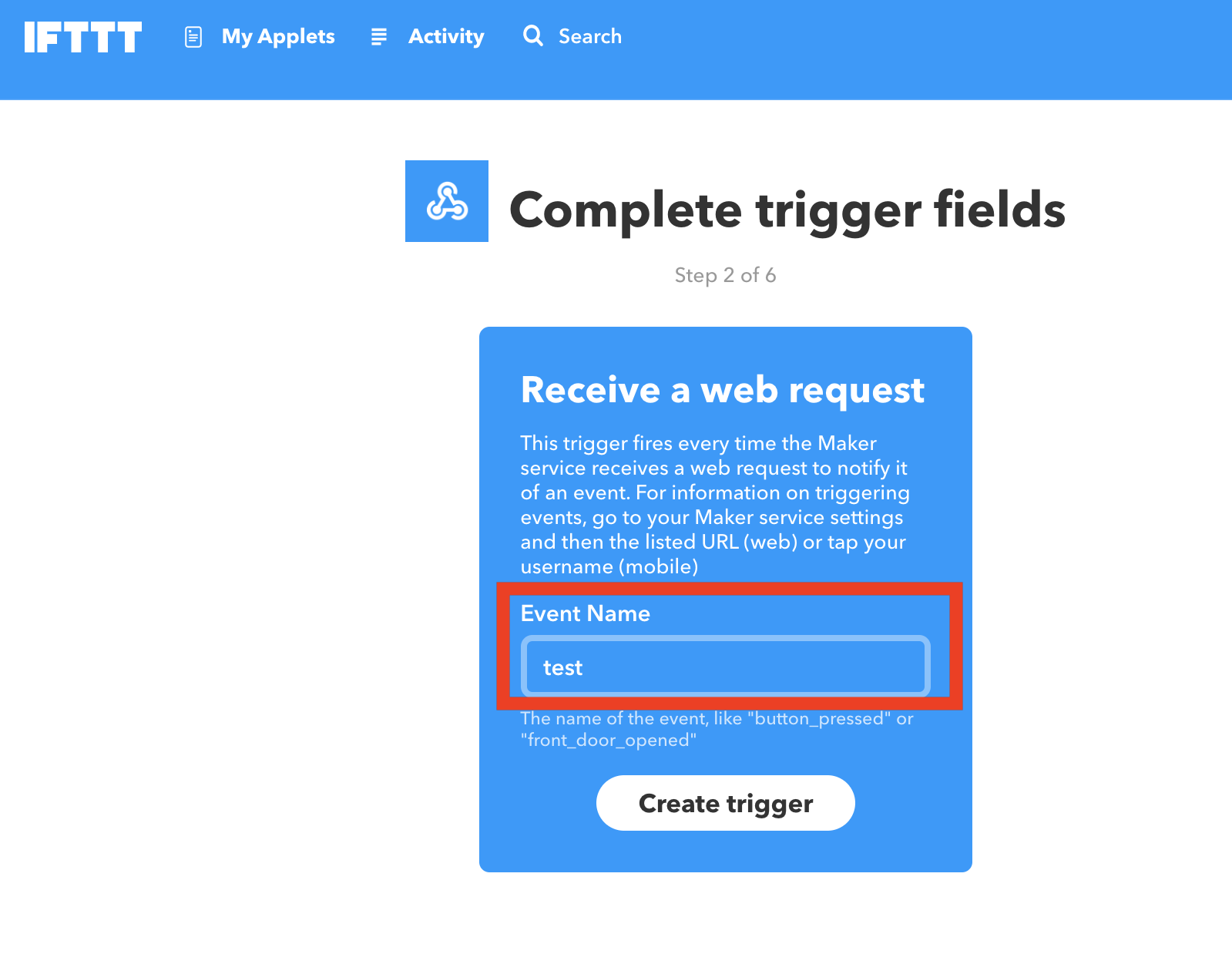
実際にThis部分を指定する画面は以下となります。
Event Nameを設定する部分があり、ここで、設定した文字列がURL部分{event}となります。

例:https://maker.ifttt.com/trigger/test/with/key/XXXXXXXXXXXXXXXXXXXXXX
トリガーアクセス時に変数を加える場合は、GETやPOSTで変数を与えます。

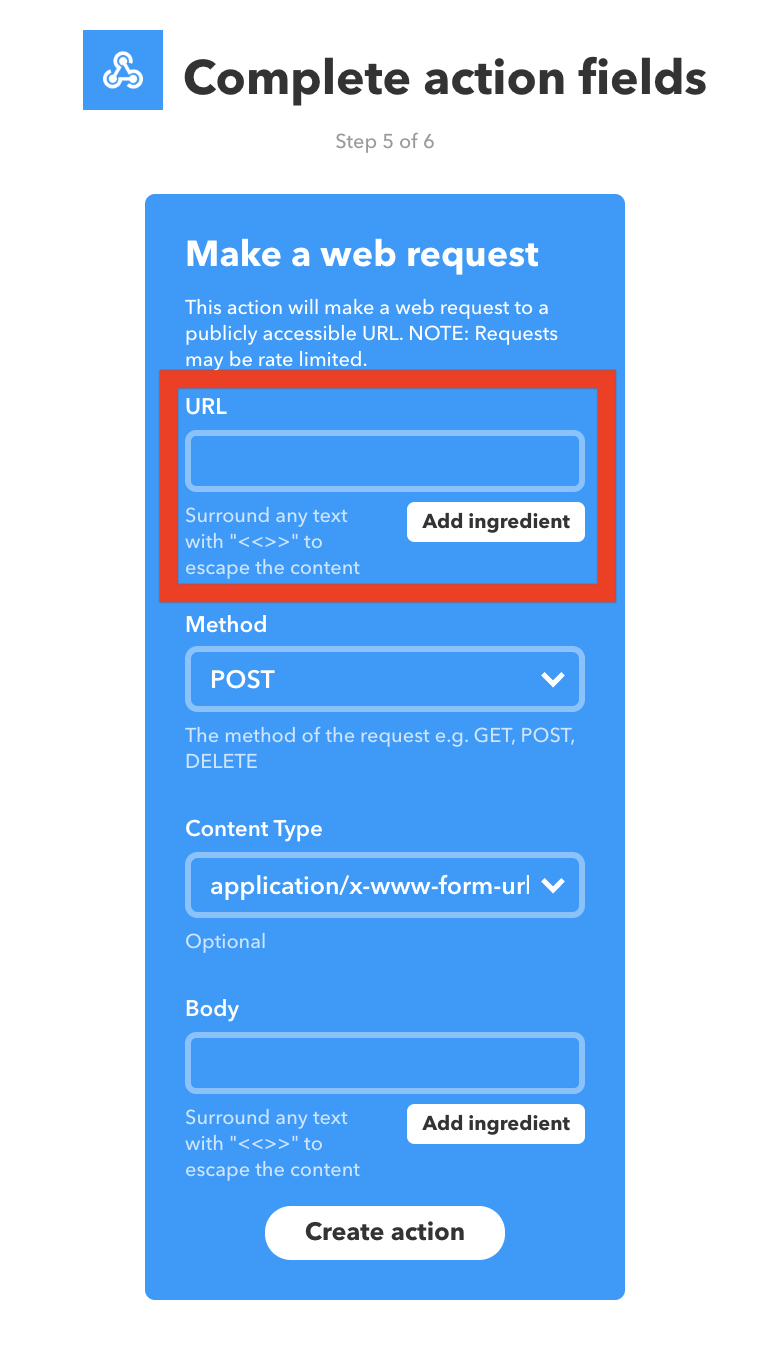
アクション(This)


Webhookより外部にURLアクセスを実施します。
その際のアクセスするURLや、自分がSynologyなどに準備したPHPファイルなどのWEBコンテンツとなります。
アクセスURLにWEBアクセス方法GETやPOSTなど、そしてコンテンツタイプおよびBodyに変数を指定します。
日本語を扱う場面も多いと思うので、URLエンコードされたコンテンツの送信をオススメします。


前提条件

  • Synologyのサーバの公開設定が終わっている
    • ルーターのNAT / Port Foward / Virtual Serverの設定が出来ており、インタネットからサーバーにアクセスできる

DDNS(Dynamic DNS)ダイナミックDNS/動的DNS

インターネットを利用する際に必要となる、パブリックIPアドレス(インターネットにおける世界で一意なアドレス)。
ドメイン(miki-ie.comなど)は、人にもわかりやすい表札や屋号のようなもの。
DNS(Domain Name Serivce)は、ドメインとIPアドレスの割り当てを行います。

DDNSとは、IPアドレスが頻繁に変わるホストに固定的にドメイン名を割り当て、アドレス変更に即座に追随してDNS情報を更新するシステム。 また、その仕組みを利用して提供される動的なDNSサービス。

企業向けなどには固定IPアドレスが利用され、DNS(Domain Name System)運用においてもIPアドレスとドメイン名を固定的に長期間結びつけた運用となる。
個人宅など、一般のインターネットプロバイダ(ISP)を利用した際は、インターネットプロバイダより、一時的なIPアドレスが割り当てられる。

よって、通常の自宅環境でドメインを運用した際は、利用するIPアドレスに合わせてDNSレコードを変更する必要があります。
www.miki-ie.com(不変に利用を続けたい) ⇔ Public IPアドレス(ISP接続毎に変わる)

独自ドメイン取得

DDNS向けに無料でドメインを貸してくれるWEBサービスもありますが、永続的な無料での利用などが約束されているわけでもなく、WEBサイトなどを運営する際は、独自ドメインを利用するのも悪くないと考えています。

VALUE-DOMAIN(バリュードメイン)

  • 500種類以上の独自ドメインを取り扱い。
  • 自動更新設定、一括ドメイン取得・更新など運用がしやすい
  • ネームサーバー/DNSレコード設定/Whois代行などドメイン運用の基本機能も標準装備
  • 「バリューサーバー」「コアサーバー」「XREA」などのホスティングとの連携が容易


VALUE-DOMAINでのDDNS利用時のIP更新方法

VALUE-DOMAINで本設定を行う際は、VALUE-DOMAINのポータルサイトよりIP更新時に用いるドメインのパスワードを取得する必要があります。
参考URL:https://www.value-domain.com/ddns.php?action=howto

ツールなどからのアクセス先(HTTP GET/POSTリクエスト)

https://dyn.value-domain.com/cgi-bin/dyn.fcg?d=ドメイン名&p=パスワード&h=ホスト名&i=IPアドレス

パラメータ説明
d更新するドメインを指定します。
例:value-domain.com
p更新するドメインのパスワードを指定します。
例: 1234
h更新するドメインのホスト名を指定します。DNSレコード編集画面のホスト名と全く同じ仕様です。
例: *(全ホスト)、www、指定なしはホスト名なし
i更新するドメインのIPアドレスを指定します。指定しない場合は、自動的に接続者のIPアドレスが設定されます。
aaaaレコードが存在し、IPアドレスがIPv6フォーマットの場合、aaaaレコードのホストがアップデートされます。

SynologyへVALUE-DOMAINのDDNS更新を設定

SynologyへVALUE-DOMAIN向けのプロバイダ登録を実施

「コントロールパネル」「外部アクセス」「DDNS」「カスタマイズ」よりDDNSプロバイダを新規登録します。
Query URLへは、以下を登録し、一部はSynologyの設定画面で設定する設定値を利用するために、準備されている変数を利用します。

  • ユーザー名:__USERNAME__ d=ドメイン名
  •  パスワード:__PASSWORD__ p=パスワード
  •  ホスト名:__HOSTNAME__ 利用しない
  • 外部アドレス:__MYIP__ i=IPアドレス

※ ホスト名(h=ホスト名)は、「 *(全ホスト)」を固定指定。


https://dyn.value-domain.com/cgi-bin/dyn.fcg?d=__USERNAME__&p=__PASSWORD__&h=*&i=__MYIP__

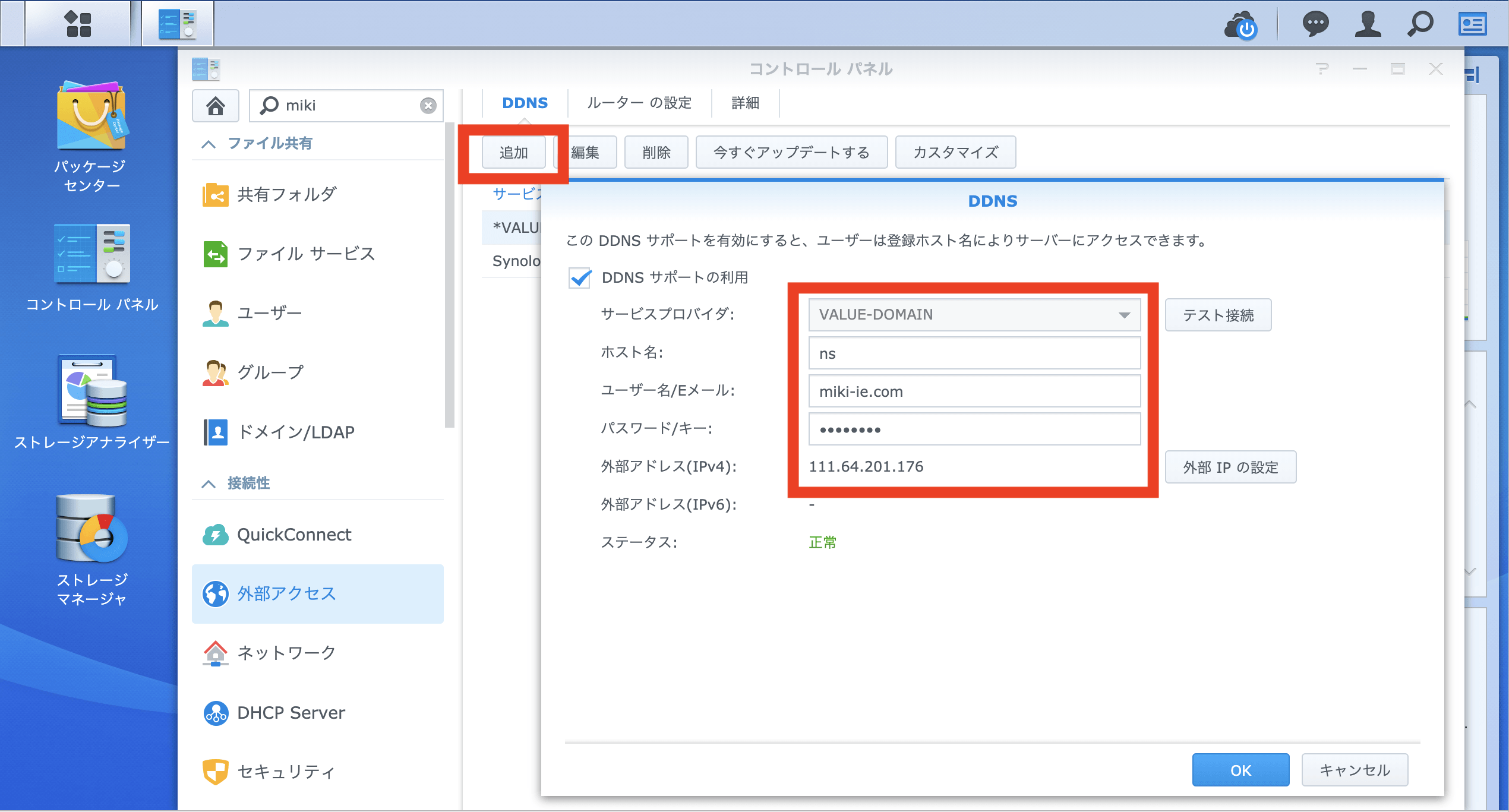
SynologyへVALUE-DOMAIN向けDDNS更新を設定

「コントロールパネル」「外部アクセス」「DDNS」「追加」より作成したサービス・プロバイダVALUE-DOMAINに必要な情報をINPUTします。
※ ホスト名は何を設定しても、実際には「*」となります。このフォームに「*」のしては不可能な仕様となっておりました。


API連携プラットフォーム概要(Overview)

ラズベリーパイ(Raspberry Pi)とNAS(Synology)の使い分け

記載済み記事

ネットワーク構成

SynologyのWEBサーバとRaspberry PiのWEB APIを外部公開にする必要があります。
SynologyとRaspberry Piの両方をWEBサーバーとして、外部公開します。
通常WEBサービスでは、ポート80(http://)と443(https://)が利用されます。
家庭向けの製品では、パケットの到着ポートで、アクセスURLを見て、パケット送付先を振り分けることは出来ないので、2台のWEBサーバを公開する際は、1台を別ポートで運用します。

NAT / Port Forward / Virtual Server設定

インターネット側IP+Port を ローカルネット側IP+Port の転送ルールを設定します。この技術や機能名がNAT、Port ForwardやVirtual Serverと呼ばれております。

パブリック側プライベート側
(グローバルIP)Port:80(Synology プライベートIP)Port:80
(グローバルIP)Port:443(Synology プライベートIP)Port:443
(グローバルIP)Port:8443(Raspberry PiプライベートIP)Port:443

この際に、グローバル側からのRaspberry Piへのアクセス方法は、「https://www.miki.-ie.com:8443」とポート番号を指定したアドレスとなります。

複数DOMAIN(ドメイン)の運用

複数の独自ドメインでWEBサーバを運用します。これは、WEBサーバのVirtual Server機能で実現します。Synologyでは、簡単に設定が可能ですので、設定方法などは割愛します。