コンテンツへスキップ

Raspberry Piからのメール送信

Raspberry Pi 3 Model B+の利用を開始すると、Raspberry Piの各種モジュールへ通知先のメールアドレスを設定することがあります。
パッケージのアップデートやログのローテーション処理時のエラーなどもメール通知することが可能です。

今回は、Raspberry Piへ「mailutils」を導入し、以前に構築したSynology SMTPを経由し、e-mailを送信できる環境の構築を行います。
SynologyでSMTP(メールサーバ)構築

「mailutils」「ssmtp」インストール

$ sudo apt-get install -y mailutils
$ sudo apt-get install ssmtp

ssmtp.confを編集。

$ vi /etc/ssmtp/ssmtp.conf
#
# Config file for sSMTP sendmail
#
# The person who gets all mail for userids < 1000
# Make this empty to disable rewriting.
root=postmaster

# The place where the mail goes. The actual machine name is required no
# MX records are consulted. Commonly mailhosts are named mail.domain.com
mailhub=@SynologyIP@

# Where will the mail seem to come from?
#rewriteDomain=

# The full hostname
hostname=raspberrypi.miki-ie.com

# Are users allowed to set their own From: address?
# YES - Allow the user to specify their own From: address
# NO - Use the system generated From: address
#FromLineOverride=YES

メール送信テスト

@raspberrypi:~ $ mail -s test aaaa@gmail.com -aFrom:miki@192.168.0.108
Cc:
Null message body; hope that's ok

送信は、「Ctrl + D」コントロール + Dで送信します。

参考にさせて頂いたサイト

@raspberrypi:~ $ sudo apt-get install -y mailutils
パッケージリストを読み込んでいます... 完了
依存関係ツリーを作成しています
状態情報を読み取っています... 完了
以下のパッケージが自動でインストールされましたが、もう必要とされていません:
rpi.gpio-common
これを削除するには 'sudo apt autoremove' を利用してください。
以下の追加パッケージがインストールされます:
exim4-base exim4-config exim4-daemon-light guile-2.2-libs libgc1c2
libgnutls-dane0 libgsasl7 libkyotocabinet16v5 liblzo2-2 libmailutils5
libntlm0 libunbound8 mailutils-common
提案パッケージ:
exim4-doc-html | exim4-doc-info eximon4 spf-tools-perl swaks dns-root-data
mailutils-mh mailutils-doc
以下のパッケージが新たにインストールされます:
exim4-base exim4-config exim4-daemon-light guile-2.2-libs libgc1c2
libgnutls-dane0 libgsasl7 libkyotocabinet16v5 liblzo2-2 libmailutils5
libntlm0 libunbound8 mailutils mailutils-common
アップグレード: 0 個、新規インストール: 14 個、削除: 0 個、保留: 0 個。
10.4 MB のアーカイブを取得する必要があります。
この操作後に追加で 53.4 MB のディスク容量が消費されます。
取得:1 http://raspbian.raspberrypi.org/raspbian buster/main armhf libgc1c2 armhf 1:7.6.4-0.4 [212 kB]
取得:2 http://raspbian.raspberrypi.org/raspbian buster/main armhf exim4-config all 4.92-8 [323 kB]
取得:3 http://raspbian.raspberrypi.org/raspbian buster/main armhf exim4-base armhf 4.92-8 [1,131 kB]
取得:4 http://raspbian.raspberrypi.org/raspbian buster/main armhf libunbound8 armhf 1.9.0-2 [403 kB]
取得:5 http://raspbian.raspberrypi.org/raspbian buster/main armhf libgnutls-dane0 armhf 3.6.7-4 [314 kB]
取得:6 http://raspbian.raspberrypi.org/raspbian buster/main armhf exim4-daemon-light armhf 4.92-8 [492 kB]
取得:7 http://raspbian.raspberrypi.org/raspbian buster/main armhf guile-2.2-libs armhf 2.2.4+1-2 [4,914 kB]
取得:8 http://raspbian.raspberrypi.org/raspbian buster/main armhf libntlm0 armhf 1.5-1 [21.3 kB]
取得:9 http://raspbian.raspberrypi.org/raspbian buster/main armhf libgsasl7 armhf 1.8.0-8+b1 [196 kB]
取得:10 http://raspbian.raspberrypi.org/raspbian buster/main armhf liblzo2-2 armhf 2.10-0.1 [48.4 kB]
取得:11 http://raspbian.raspberrypi.org/raspbian buster/main armhf libkyotocabinet16v5 armhf 1.2.76-4.2+rpi1 [280 kB]
取得:12 http://raspbian.raspberrypi.org/raspbian buster/main armhf mailutils-common all 1:3.5-3 [689 kB]
取得:13 http://raspbian.raspberrypi.org/raspbian buster/main armhf libmailutils5 armhf 1:3.5-3 [810 kB]
取得:14 http://raspbian.raspberrypi.org/raspbian buster/main armhf mailutils armhf 1:3.5-3 [566 kB]
10.4 MB を 36秒 で取得しました (289 kB/s)
パッケージを事前設定しています ...
以前に未選択のパッケージ libgc1c2:armhf を選択しています。
(データベースを読み込んでいます ... 現在 143081 個のファイルとディレクトリがインストールされています。)
.../00-libgc1c2_1%3a7.6.4-0.4_armhf.deb を展開する準備をしています ...
libgc1c2:armhf (1:7.6.4-0.4) を展開しています...
以前に未選択のパッケージ exim4-config を選択しています。
.../01-exim4-config_4.92-8_all.deb を展開する準備をしています ...
exim4-config (4.92-8) を展開しています...
以前に未選択のパッケージ exim4-base を選択しています。
.../02-exim4-base_4.92-8_armhf.deb を展開する準備をしています ...
exim4-base (4.92-8) を展開しています...
以前に未選択のパッケージ libunbound8:armhf を選択しています。
.../03-libunbound8_1.9.0-2_armhf.deb を展開する準備をしています ...
libunbound8:armhf (1.9.0-2) を展開しています...
以前に未選択のパッケージ libgnutls-dane0:armhf を選択しています。
.../04-libgnutls-dane0_3.6.7-4_armhf.deb を展開する準備をしています ...
libgnutls-dane0:armhf (3.6.7-4) を展開しています...
以前に未選択のパッケージ exim4-daemon-light を選択しています。
.../05-exim4-daemon-light_4.92-8_armhf.deb を展開する準備をしています ...
exim4-daemon-light (4.92-8) を展開しています...
以前に未選択のパッケージ guile-2.2-libs:armhf を選択しています。
.../06-guile-2.2-libs_2.2.4+1-2_armhf.deb を展開する準備をしています ...
guile-2.2-libs:armhf (2.2.4+1-2) を展開しています...
以前に未選択のパッケージ libntlm0:armhf を選択しています。
.../07-libntlm0_1.5-1_armhf.deb を展開する準備をしています ...
libntlm0:armhf (1.5-1) を展開しています...
以前に未選択のパッケージ libgsasl7 を選択しています。
.../08-libgsasl7_1.8.0-8+b1_armhf.deb を展開する準備をしています ...
libgsasl7 (1.8.0-8+b1) を展開しています...
以前に未選択のパッケージ liblzo2-2:armhf を選択しています。
.../09-liblzo2-2_2.10-0.1_armhf.deb を展開する準備をしています ...
liblzo2-2:armhf (2.10-0.1) を展開しています...
以前に未選択のパッケージ libkyotocabinet16v5:armhf を選択しています。
.../10-libkyotocabinet16v5_1.2.76-4.2+rpi1_armhf.deb を展開する準備をしています ...
libkyotocabinet16v5:armhf (1.2.76-4.2+rpi1) を展開しています...
以前に未選択のパッケージ mailutils-common を選択しています。
.../11-mailutils-common_1%3a3.5-3_all.deb を展開する準備をしています ...
mailutils-common (1:3.5-3) を展開しています...
以前に未選択のパッケージ libmailutils5:armhf を選択しています。
.../12-libmailutils5_1%3a3.5-3_armhf.deb を展開する準備をしています ...
libmailutils5:armhf (1:3.5-3) を展開しています...
以前に未選択のパッケージ mailutils を選択しています。
.../13-mailutils_1%3a3.5-3_armhf.deb を展開する準備をしています ...
mailutils (1:3.5-3) を展開しています...
libgc1c2:armhf (1:7.6.4-0.4) を設定しています ...
liblzo2-2:armhf (2.10-0.1) を設定しています ...
libunbound8:armhf (1.9.0-2) を設定しています ...
libntlm0:armhf (1.5-1) を設定しています ...
mailutils-common (1:3.5-3) を設定しています ...
exim4-config (4.92-8) を設定しています ...
Adding system-user for exim (v4)
guile-2.2-libs:armhf (2.2.4+1-2) を設定しています ...
libgnutls-dane0:armhf (3.6.7-4) を設定しています ...
exim4-base (4.92-8) を設定しています ...
exim: DB upgrade, deleting hints-db
libkyotocabinet16v5:armhf (1.2.76-4.2+rpi1) を設定しています ...
libgsasl7 (1.8.0-8+b1) を設定しています ...
exim4-daemon-light (4.92-8) を設定しています ...
Initializing GnuTLS DH parameter file
libmailutils5:armhf (1:3.5-3) を設定しています ...
mailutils (1:3.5-3) を設定しています ...
update-alternatives: /usr/bin/frm (frm) を提供するために自動モードで /usr/bin/frm.mailutils を使います
update-alternatives: /usr/bin/from (from) を提供するために自動モードで /usr/bin/from.mailutils を使います
update-alternatives: /usr/bin/messages (messages) を提供するために自動モードで /usr/bin/messages.mailutils を使います
update-alternatives: /usr/bin/movemail (movemail) を提供するために自動モードで /usr/bin/movemail.mailutils を使います
update-alternatives: /usr/bin/readmsg (readmsg) を提供するために自動モードで /usr/bin/readmsg.mailutils を使います
update-alternatives: /usr/bin/dotlock (dotlock) を提供するために自動モードで /usr/bin/dotlock.mailutils を使います
update-alternatives: /usr/bin/mailx (mailx) を提供するために自動モードで /usr/bin/mail.mailutils を使います
systemd (241-5+rpi1) のトリガを処理しています ...
man-db (2.8.5-2) のトリガを処理しています ...
libc-bin (2.28-10+rpi1) のトリガを処理しています ...

@raspberrypi:~ $ sudo apt-get install ssmtp
パッケージリストを読み込んでいます... 完了
依存関係ツリーを作成しています
状態情報を読み取っています... 完了
以下のパッケージが自動でインストールされましたが、もう必要とされていません:
libgnutls-dane0 libunbound8 rpi.gpio-common
これを削除するには 'sudo apt autoremove' を利用してください。
以下の追加パッケージがインストールされます:
libgnutls-openssl27
以下のパッケージは「削除」されます:
exim4-base exim4-config exim4-daemon-light
以下のパッケージが新たにインストールされます:
libgnutls-openssl27 ssmtp
アップグレード: 0 個、新規インストール: 2 個、削除: 3 個、保留: 0 個。
368 kB のアーカイブを取得する必要があります。
この操作後に 3,377 kB のディスク容量が解放されます。
続行しますか? [Y/n] y
取得:1 http://raspbian.raspberrypi.org/raspbian buster/main armhf libgnutls-openssl27 armhf 3.6.7-4 [314 kB]
取得:2 http://raspbian.raspberrypi.org/raspbian buster/main armhf ssmtp armhf 2.64-8 [54.2 kB]
#
368 kB を 3秒 で取得しました (122 kB/s)
パッケージを事前設定しています ...
(データベースを読み込んでいます ... 現在 144153 個のファイルとディレクトリがインストールされています。)
exim4-daemon-light (4.92-8) を削除しています ...
exim4-base (4.92-8) を削除しています ...
exim4-config (4.92-8) を削除しています ...
以前に未選択のパッケージ libgnutls-openssl27:armhf を選択しています。
(データベースを読み込んでいます ... 現在 144019 個のファイルとディレクトリがインストールされています。)
.../libgnutls-openssl27_3.6.7-4_armhf.deb を展開する準備をしています ...
libgnutls-openssl27:armhf (3.6.7-4) を展開しています...
以前に未選択のパッケージ ssmtp を選択しています。
.../ssmtp_2.64-8_armhf.deb を展開する準備をしています ...
ssmtp (2.64-8) を展開しています...
libgnutls-openssl27:armhf (3.6.7-4) を設定しています ...
ssmtp (2.64-8) を設定しています ...
man-db (2.8.5-2) のトリガを処理しています ...
libc-bin (2.28-10+rpi1) のトリガを処理しています ...
miki@raspberrypi:~ $ sudo vi /etc/ssmtp/
revaliases ssmtp.conf
miki@raspberrypi:~ $ sudo vi /etc/ssmtp/
revaliases ssmtp.conf
miki@raspberrypi:~ $ sudo vi /etc/ssmtp/ssmtp.conf
miki@raspberrypi:~ $
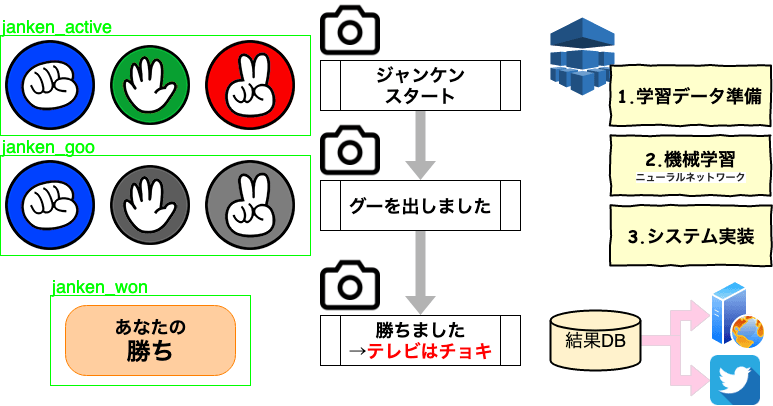
めざましじゃんけん 画像検出システム

めざましじゃんけん結果

テレビ画像よりフジテレビ、めざましテレビ内で実施されるめざましじゃんけんの結果を蓄積します。めざましじゃんけんは、デジタル放送のコンテンツであり、B-CAS(ビーキャス)カードを用いた受信装置により、データ放送を画面表示させ、リアルタイムに参加する必要があります。番組録画しても、データ放送のコンテンツは録画することは出来ません。

  1. 環境準備(インストール)

  2. Darknet/YOLOで学習モデル準備

  3. システム実装と結果公開

  4. プログラム関連技術

本システム実装に関連した、プログラム関係のTips。

    • PHP
    • Python
  1. 【機械学習導入】ニューラルネットワークChainerフレームワーク

    • 導入方法
    • 機械学習
    • Out of Memoryへの対応
    • 学習モデルのRaspberry Piでの実行

2019年07月29日週 めざましじゃんけん結果

個人の実験的な試行内容であり、めざましじゃんけんの結果を保証したり、全ての結果が記載を保証するものではありません。

2019年07月29日週 のめざましじゃんけんの結果をベストエフォートで公開します。

Goo(グー) Choki(チョキ) Pa(パー)

めざましテレビ|めざましじゃんけんーフジテレビ

めざましじゃんけん結果
回次結果対戦相手
8月03日
(土曜日)
【2戦目】08時21分生じゃんけん!遠藤憲一さん
【1戦目】07時22分高見侑里キャスター
8月02日
(金曜日)
【4戦目】07時58分永島優美キャスター
【3戦目】07時35分横山ルリカ リポーター
【2戦目】06時58分指原莉乃さん
【1戦目】05時58分まちかどじゃんけん
8月01日
(木曜日)
【4戦目】07時58分小沢真珠さん
【3戦目】07時35分山本美月さん
【2戦目】06時58分佐藤新さん、影山拓也さん
【1戦目】05時58分まちかどじゃんけん
7月31日
(水曜日)
【4戦目】07時58分生じゃんけん!大貫勇輔さん
【3戦目】07時35分窪田正孝さん 山本舞香さん りんごちゃん
【2戦目】06時58分A.B.C-Z
【1戦目】05時58分まちかどじゃんけん
7月30日
(火曜日)
【4戦目】07時58分久慈暁子アナウンサー
【3戦目】07時35分長州力さん
【2戦目】06時58分三浦貴大さん
【1戦目】05時58分まちかどじゃんけん
7月29日
(月曜日)
【4戦目】07時58分内藤剛志さん
【3戦目】07時35分りんごちゃん
【2戦目】06時58分志田未来さん
【1戦目】05時58分まちかどじゃんけん

2019年08月03日 めざましじゃんけん結果

個人の実験的な試行内容であり、めざましじゃんけんの結果を保証したり、全ての結果が記載を保証するものではありません。

2019年08月03日のめざましじゃんけんの結果をベストエフォートで公開します。

Goo(グー) Choki(チョキ) Pa(パー)

めざましテレビ|めざましじゃんけんーフジテレビ

めざましじゃんけん結果
回次結果対戦相手
8月03日
(土曜日)
【2戦目】08時21分生じゃんけん!遠藤憲一さん
【1戦目】07時22分高見侑里キャスター

2019年08月02日 めざましじゃんけん結果

個人の実験的な試行内容であり、めざましじゃんけんの結果を保証したり、全ての結果が記載を保証するものではありません。

2019年08月02日のめざましじゃんけんの結果をベストエフォートで公開します。

Goo(グー) Choki(チョキ) Pa(パー)

めざましテレビ|めざましじゃんけんーフジテレビ

めざましじゃんけん結果
回次結果対戦相手
8月02日
(金曜日)
【4戦目】07時58分永島優美キャスター
【3戦目】07時35分横山ルリカ リポーター
【2戦目】06時58分指原莉乃さん
【1戦目】05時58分まちかどじゃんけん

メールデータのマルチバイト文字処理

SendGridのInbound Email Parse向けPHP APIを公開しましたが、受信メールアドレスにより文字化けが発生しました。
SendGrid-Inbound Email Parse Webhookでメール受信をPUSH(第2回)
PHPでメールデータ取り扱い時には、サーバー側のphp.iniなどの文字コード設定など、よく悩まされます。
SendGridでは、POSTでcharsetsデータを送付してきますが、そのcharsetを用いてmb_convert_encoding関数を用いて、エンコーディング変換しても文字化けが発生しました。

文字コード変換の便利な関数を紹介しているサイトがありましたので、紹介しておきます。これらの関数を用いて、文字化けが解消するケースもありました。
基本的に、今回のSendGridnoInbound Email Parseは、IoT向けなので、必要な部分を絞ってメール情報を利用すれば運用回避もできるのですが、文字コードの正確なでコード処理が必要な場面もあり、以下関数を利用させて頂きました。

/**
 * 日本語文字列の文字コード判定(ASCII/JIS/eucJP-win/SJIS-win/UTF-8 のみ)
 */
function detect_encoding_ja( $str )
{
    $enc = @mb_detect_encoding( $str, 'ASCII,JIS,eucJP-win,SJIS-win,UTF-8' );

    switch ( $enc ) {
    case FALSE   :
    case 'ASCII' : 
    case 'JIS'   : 
    case 'UTF-8' : break;
    case 'eucJP-win' :
        // ここで eucJP-win を検出した場合、eucJP-win として判定
        if ( @mb_detect_encoding( $str, 'SJIS-win,UTF-8,eucJP-win' ) === 'eucJP-win' ) {
            break;
        }
        $_hint = "\xbf\xfd" . $str; // "\xbf\xfd" : EUC-JP "雀"

        // EUC-JP -> UTF-8 変換時にマッピングが変更される文字を削除( ≒ ≡ ∫ など)
        mb_regex_encoding( 'EUC-JP' );
        $_hint = mb_ereg_replace( "\xad(?:\xe2|\xf5|\xf6|\xf7|\xfa|\xfb|\xfc|\xf0|\xf1|\xf2)", '', $_hint );

        $_tmp  = mb_convert_encoding( $_hint, 'UTF-8', 'eucJP-win' );
        $_tmp2 = mb_convert_encoding( $_tmp,  'eucJP-win', 'UTF-8' );
        if ( $_tmp2 === $_hint ) {

            // 例外処理( EUC-JP 以外と認識する範囲 )
            if (
                // SJIS と重なる範囲(2バイト|3バイト|iモード絵文字|1バイト文字)
                ! preg_match( '/^(?:'
                    . '[\x8E\xE0-\xE9][\x80-\xFC]|\xEA[\x80-\xA4]|'
                    . '\x8F[\xB0-\xEF][\xE0-\xEF][\x40-\x7F]|'
                    . '\xF8[\x9F-\xFC]|\xF9[\x40-\x49\x50-\x52\x55-\x57\x5B-\x5E\x72-\x7E\x80-\xB0\xB1-\xFC]|'
                    . '[\x00-\x7E]'
                    . ')+$/', $str ) && 

                // UTF-8 と重なる範囲(全角英数字|漢字|1バイト文字)
                ! preg_match( '/^(?:'
                    . '\xEF\xBC[\xA1-\xBA]|[\x00-\x7E]|'
                    . '[\xE4-\xE9][\x8E-\x8F\xA1-\xBF][\x8F\xA0-\xEF]|'
                    . '[\x00-\x7E]'
                    . ')+$/', $str )
            ) {
                // 条件式の範囲に入らなかった場合は、eucJP-win として検出
                break;
            }
            // 例外処理2(一部の頻度の多そうな熟語は eucJP-win として判定)
            // (珈琲|琥珀|瑪瑙|癇癪|碼碯|耄碌|膀胱|蒟蒻|薔薇|蜻蛉)
            if ( mb_ereg( '^(?:'
                . '\xE0\xDD\xE0\xEA|\xE0\xE8\xE0\xE1|\xE0\xF5\xE0\xEF|\xE1\xF2\xE1\xFB|'
                . '\xE2\xFB\xE2\xF5|\xE6\xCE\xE2\xF1|\xE7\xAF\xE6\xF9|\xE8\xE7\xE8\xEA|'
                . '\xE9\xAC\xE9\xAF|\xE9\xF1\xE9\xD9|[\x00-\x7E]'
                . ')+$', $str )
            ) {
                break;
            }
        }

    default :
        // ここで SJIS-win と判断された場合は、文字コードは SJIS-win として判定
        $enc = @mb_detect_encoding( $str, 'UTF-8,SJIS-win' );
        if ( $enc === 'SJIS-win' ) {
            break;
        }
        // デフォルトとして SJIS-win を設定
        $enc   = 'SJIS-win';

        $_hint = "\xe9\x9b\x80" . $str; // "\xe9\x9b\x80" : UTF-8 "雀"

        // 変換時にマッピングが変更される文字を調整
        mb_regex_encoding( 'UTF-8' );
        $_hint = mb_ereg_replace( "\xe3\x80\x9c", "\xef\xbd\x9e", $_hint );
        $_hint = mb_ereg_replace( "\xe2\x88\x92", "\xe3\x83\xbc", $_hint );
        $_hint = mb_ereg_replace( "\xe2\x80\x96", "\xe2\x88\xa5", $_hint );

        $_tmp  = mb_convert_encoding( $_hint, 'SJIS-win', 'UTF-8' );
        $_tmp2 = mb_convert_encoding( $_tmp,  'UTF-8', 'SJIS-win' );

        if ( $_tmp2 === $_hint ) {
            $enc = 'UTF-8';
        }
        // UTF-8 と SJIS 2文字が重なる範囲への対処(SJIS を優先)
        if ( preg_match( '/^(?:[\xE4-\xE9][\x80-\xBF][\x80-\x9F][\x00-\x7F])+/', $str ) ) {
            $enc = 'SJIS-win';
        }
    }
    return $enc;
}


function decode_mimeheader($str) {

	$enc_r = array(  // 変換するエンコーディング文字列を設定
		'iso-2022-jp' => 'iso-2022-jp-ms' ,
		'shift_jis'   => 'sjis-win'       ,
		'euc-jp'      => 'eucjp-win'      ,
		'utf-8'       => 'utf-8'
	);

	$str = str_replace('?==?' , "?=\n=?" , $str);  // 未改行文字対策

	$decode_str = '';
	foreach (preg_split('/\s/', $str) as $split_str) {  // SPACEで分割
		if (strlen($split_str) === 0) {
			$decode_str .= ($decode_str != '' ? ' ' : '');
			continue;
		}
		
		if (preg_match('/(.*?)=\?([^\?]+)\?([^\?]+)\?([^\?]+)\?=(.*?)$/', $split_str, $matches)) {  // =?[Charset]?[Text]?=形式の場合
			$enc_str  = strtolower($matches[2]);
			$from_enc = isset($enc_r[$enc_str]) ? $enc_r[$enc_str] : $enc_str;
			if ($from_enc != '') {
				$match_decode = null;
				switch (strtoupper($matches[3])) {
					case 'B':
						$match_decode = base64_decode($matches[4]);
						break;
					case 'Q':
						$match_decode = quoted_printable_decode($matches[4]);
						break;
				}
				if (!is_null($match_decode)) { // 変換に成功した場合のみ変換後テキストを追加し次の行へ
					$decode_str .= ($decode_str != '' ? ' ' : '') . mb_convert_encoding( $matches[1].$match_decode.$matches[5], mb_internal_encoding(), $from_enc );
					continue;
				}
			}
		}
		// 変換できなかった場合、又は =?[Charset]?[Text]?= 形式でなかった場合は、テキストのキャラクタセットを自動検出して変換する
		$decode_str .= ($decode_str != '' ? ' ' : '') . mb_convert_encoding( $split_str , mb_internal_encoding() , detect_encoding_ja( $split_str ) );
	}

	return $decode_str;
}

2019年08月01日 めざましじゃんけん結果

個人の実験的な試行内容であり、めざましじゃんけんの結果を保証したり、全ての結果が記載を保証するものではありません。

2019年08月01日のめざましじゃんけんの結果をベストエフォートで公開します。

Goo(グー) Choki(チョキ) Pa(パー)

めざましテレビ|めざましじゃんけんーフジテレビ

めざましじゃんけん結果
回次結果
8月01日
(木曜日)
07時58分
07時35分
06時58分
05時58分

Raspberry Piでマイクロ秒単位、ミリ秒単位のSleep

1秒より短いスリープを利用したい場面もあると思います。
「usleep」を利用しようとしましたが、Raspberry Piでは利用出来ませんでした。当然初期状態では、「sleepenh」もインストールされていませんでした。

root@raspberrypi:~# usleep
-bash: usleep: コマンドが見つかりません
root@raspberrypi:~# sleepenh
-bash: sleepenh: コマンドが見つかりません

「sleepenh」のインストール実施

sleepenh利用時には、一秒以下は小数点で指定する必要があります。

root@raspberrypi:~# apt-get install sleepenh
パッケージリストを読み込んでいます... 完了
依存関係ツリーを作成しています
状態情報を読み取っています... 完了
以下のパッケージが自動でインストールされましたが、もう必要とされていません:
libboost-system1.62.0 libboost-thread1.62.0 libreoffice-gtk2
これを削除するには 'apt autoremove' を利用してください。
以下のパッケージが新たにインストールされます:
sleepenh
アップグレード: 0 個、新規インストール: 1 個、削除: 0 個、保留: 0 個。
8,912 B のアーカイブを取得する必要があります。
この操作後に追加で 26.6 kB のディスク容量が消費されます。
取得:1 http://ftp.tsukuba.wide.ad.jp/Linux/raspbian/raspbian buster/main armhf sleepenh armhf 1.7-1 [8,912 B]
8,912 B を 2秒 で取得しました (3,950 B/s)
以前に未選択のパッケージ sleepenh を選択しています。
(データベースを読み込んでいます ... 現在 161139 個のファイルとディレクトリがインストールされています。)
.../sleepenh_1.7-1_armhf.deb を展開する準備をしています ...
Isleepenh (1.7-1) を展開しています...
sleepenh (1.7-1) を設定しています ...
man-db (2.8.5-2) のトリガを処理しています ...

root@raspberrypi:~# sleepenh -h
Usage: sleepenh [[--warp|-w] INITIALTIME] TIMETOSLEEP

An enhanced sleep program.

Options:
-h, --help display this help and exit
-w, --warp warp resulting timestamp, when there is no need
to sleep. An immediately following call of
sleepenh with the resulting TIMESTAMP would
most probably result in a real sleep.
-V, --version output version information and exit

TIMETOSLEEP is in seconds, microsecond resolution, ex: 80.123456.
INITIALTIME is the output value of a previous execution of sleepenh.
root@raspberrypi:~# sleepenh 0.5
1563487094.854379
root@raspberrypi:~# sleepenh 1
1563487105.724811
root@raspberrypi:~# sleepenh 10
1563487119.604938
root@raspberrypi:~# exit
exit
Script done, file is sleepenh.log

参考にさせて頂いたサイト

KuroNeko666’s blog

2019年07月31日 めざましじゃんけん結果

個人の実験的な試行内容であり、めざましじゃんけんの結果を保証したり、全ての結果が記載を保証するものではありません。

2019年07月31日のめざましじゃんけんの結果をベストエフォートで公開します。

Goo(グー)
Choki(チョキ)
Pa(パー)

めざましテレビ|めざましじゃんけんーフジテレビ

めざましじゃんけん結果
回次結果
7月31日
(水曜日)
07時58分
07時35分
06時58分
05時58分

PHPのPEARライブラリーをインストール

開発自体は、できる限り手間をかけずに各種実装を進めているのですが、プログラム言語により各種フレームワークが準備されております。
最近の利用実態は分かりませんが、以前はPHPのPEARは、各所で利用されておりました。
Raspberry Piに導入した際の手順を公開します。

マニュアルでインストールしようとしたのですが、apt-getしたソフトで全く問題なかったので、簡単な手順となりました。
DBを例に、個別の機能をインストールする際の例も記載しております。

sudo apt-get install php-pear
sudo pear update-channels
sudo pear upgrade-all
sudo pear install DB

導入時点では、以下のパッケージがインストールされていました。

  • Archive_Tar 1.4.7 stable
  • Console_Getopt 1.4.2 stable
  • PEAR 1.10.9 stable
  • PEAR_Manpages 1.10.0 stable
  • Structures_Graph 1.1.1 stable
  • XML_Util 1.4.3 stable

以下、コマンド抜粋です。

@raspberrypi:~ $ sudo apt-get install php-pear
[sudo] パスワード:
パッケージリストを読み込んでいます... 完了
依存関係ツリーを作成しています
状態情報を読み取っています... 完了
php-pear はすでに最新バージョン (1:1.10.6+submodules+notgz-1.1) です。
php-pear は手動でインストールしたと設定されました。
アップグレード: 0 個、新規インストール: 0 個、削除: 0 個、保留: 0 個。

@raspberrypi:~ $ pear -h
Commands:
build Build an Extension From C Source
bundle Unpacks a Pecl Package
channel-add Add a Channel
channel-alias Specify an alias to a channel name
channel-delete Remove a Channel From the List
channel-discover Initialize a Channel from its server
channel-info Retrieve Information on a Channel
channel-login Connects and authenticates to remote channel server
channel-logout Logs out from the remote channel server
channel-update Update an Existing Channel
clear-cache Clear Web Services Cache
config-create Create a Default configuration file
config-get Show One Setting
config-help Show Information About Setting
config-set Change Setting
config-show Show All Settings
convert Convert a package.xml 1.0 to package.xml 2.0 format
cvsdiff Run a "cvs diff" for all files in a package
cvstag Set CVS Release Tag
download Download Package
download-all Downloads each available package from the default channel
info Display information about a package
install Install Package
list List Installed Packages In The Default Channel
list-all List All Packages
list-channels List Available Channels
list-files List Files In Installed Package
list-upgrades List Available Upgrades
login Connects and authenticates to remote server [Deprecated in favor of channel-login]
logout Logs out from the remote server [Deprecated in favor of channel-logout]
makerpm Builds an RPM spec file from a PEAR package
package Build Package
package-dependencies Show package dependencies
package-validate Validate Package Consistency
pickle Build PECL Package
remote-info Information About Remote Packages
remote-list List Remote Packages
run-scripts Run Post-Install Scripts bundled with a package
run-tests Run Regression Tests
search Search remote package database
shell-test Shell Script Test
sign Sign a package distribution file
svntag Set SVN Release Tag
uninstall Un-install Package
update-channels Update the Channel List
upgrade Upgrade Package
upgrade-all Upgrade All Packages [Deprecated in favor of calling upgrade with no parameters]
Usage: pear [options] command [command-options] <parameters>
Type "pear help options" to list all options.
Type "pear help shortcuts" to list all command shortcuts.
Type "pear help version" or "pear version" to list version information.
Type "pear help <command>" to get the help for the specified command.

@raspberrypi:~ $ sudo pear update-channels
Updating channel "doc.php.net"
could not create lock file: fopen(/usr/share/php/.lock): failed to open stream: Permission denied
Updating channel "pear.php.net"
could not create lock file: fopen(/usr/share/php/.lock): failed to open stream: Permission denied
Updating channel "pecl.php.net"
could not create lock file: fopen(/usr/share/php/.lock): failed to open stream: Permission denied
miki@raspberrypi:~ $ sudo pear update-channels
Updating channel "doc.php.net"
Update of Channel "doc.php.net" succeeded
Updating channel "pear.php.net"
Update of Channel "pear.php.net" succeeded
Updating channel "pecl.php.net"
Update of Channel "pecl.php.net" succeeded

@raspberrypi:~ $ sudo pear upgrade-all
Will upgrade channel://pear.php.net/console_getopt
Will upgrade channel://pear.php.net/archive_tar
Will upgrade channel://pear.php.net/pear
WARNING: "pear/Console_Getopt" is deprecated in favor of "pear/Console_GetoptPlus"
downloading Console_Getopt-1.4.2.tgz ...
Starting to download Console_Getopt-1.4.2.tgz (5,736 bytes)
.....done: 5,736 bytes
downloading Archive_Tar-1.4.7.tgz ...
Starting to download Archive_Tar-1.4.7.tgz (21,134 bytes)
...done: 21,134 bytes
downloading PEAR-1.10.9.tgz ...
Starting to download PEAR-1.10.9.tgz (291,931 bytes)
...done: 291,931 bytes
upgrade-all ok: channel://pear.php.net/Console_Getopt-1.4.2
upgrade-all ok: channel://pear.php.net/Archive_Tar-1.4.7

Warning: "continue" targeting switch is equivalent to "break". Did you mean to use "continue 2"? in PEAR/PackageFile/v1.php on line 1424
PHP Warning: "continue" targeting switch is equivalent to "break". Did you mean to use "continue 2"? in /usr/share/php/PEAR/PackageFile/v1.php on line 1424
upgrade-all ok: channel://pear.php.net/PEAR-1.10.9
PEAR: Optional feature webinstaller available (PEAR's web-based installer)
PEAR: Optional feature gtkinstaller available (PEAR's PHP-GTK-based installer)
PEAR: Optional feature gtk2installer available (PEAR's PHP-GTK2-based installer)
PEAR: To install optional features use "pear install pear/PEAR#featurename"

@raspberrypi:~ $ sudo pear list
Installed packages, channel pear.php.net:
=========================================
Package Version State
Archive_Tar 1.4.7 stable
Console_Getopt 1.4.2 stable
PEAR 1.10.9 stable
PEAR_Manpages 1.10.0 stable
Structures_Graph 1.1.1 stable
XML_Util 1.4.3 stable
miki@raspberrypi:~ $

miki@raspberrypi:~ $ php -v
PHP 7.3.4-2 (cli) (built: Apr 13 2019 19:05:48) ( NTS )
Copyright (c) 1997-2018 The PHP Group
Zend Engine v3.3.4, Copyright (c) 1998-2018 Zend Technologies
with Zend OPcache v7.3.4-2, Copyright (c) 1999-2018, by Zend Technologies

@raspberrypi:~ $ sudo pear install DB
WARNING: "pear/DB" is deprecated in favor of "pear/MDB2"
downloading DB-1.9.3.tgz ...
Starting to download DB-1.9.3.tgz (132,290 bytes)
.............................done: 132,290 bytes
install ok: channel://pear.php.net/DB-1.9.3